
Laser Ranger 8-ch: value & command reference
Every value and command the Laser Ranger 8-ch reports to each host: what it means, its range, and how to read it on SPIKE / EV3 / Arduino I2C / mBlock / MATRIX / micro:bit. Append ?host=spike (or ev3, arduino, mblock, matrix, microbit) to the URL to expand that host by default.
SPIKEEV3Arduino I2CmBlockMATRIXmicro:bit
| Item | Detail |
|---|---|
| Factory I2C address | 0x29 |
| hw[0] | 8(F0 high byte; ID high byte in SPIKE mode 8 / EV3 mode 5) |
| Model | LASER8 |
| Protocol version | 2 |
| Hosts | SPIKE, EV3, Arduino I2C, mBlock, MATRIX, micro:bit |
Values at a glance
| Id | Value | Range | SPIKE | EV3 | Arduino I2C | mBlock | MATRIX | micro:bit |
|---|---|---|---|---|---|---|---|---|
01 |
nearest distance (cm) | 0~120 cm | ✓ | ✓ | ✓ | ✓ | — | ✓ |
02 |
nearest direction | -8~+8 | ✓ | ✓ | ✓ | ✓ | — | ✓ |
03 |
farthest distance (cm) | 0~120 cm | ✓ | ✓ | ✓ | ✓ | — | ✓ |
04 |
farthest direction | -7~+7 | ✓ | ✓ | ✓ | ✓ | — | ✓ |
05 |
front distance (cm) | 0~120 cm | — | ✓ | ✓ | ✓ | — | ✓ |
06 |
nearest distance (mm) | 0~1200 mm | ✓ | ✓ | ✓ | ✓ | — | ✓ |
07 |
init bitmap | 0~255 bit | ✓ | — | ✓ | ✓ | — | ✓ |
08 |
fault bitmap | 0~255 bit | ✓ | — | ✓ | ✓ | — | ✓ |
09 |
front distance (mm) | 0~1200 mm | ✓ | ✓ | ✓ | ✓ | — | ✓ |
10~17 |
sensor 1~8 distance (cm) | 0~120 cm | ✓ | ✓ | ✓ | ✓ | ✓ | ✓ |
18~1F |
sensor 1~8 distance (mm) | 0~1200 mm | — | — | ✓ | ✓ | — | ✓ |
✓ = available on that host; — = not sent.
Reading each value
01 nearest distance (cm) nearCm
| Item | Detail |
|---|---|
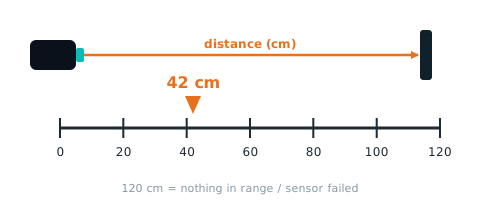
| Meaning | smallest of the 8 distances, 0~120 cm (a failed sensor counts as 120); 120 = nothing around |
| Range | 0~120 cm |
| I2C / mBlock id | 01 |
| Locked | 🔒 LEGO mode layout will not change |
How to read it
SPIKE
mode 2 byte 0; mode 3 byte 1; mode 4 v[0] hi; mode 7 v[2] 🔒; mode 9 v[4] hi 🔒. Note: [最近方向, 最近距離, 第 1 顆](第 4 byte 第 8 顆被描述表砍掉); Pybricks ambient() = int16[2]/100 = 最近 cm(INO:348-361)
from pybricks.iodevices import PUPDevice
from pybricks.parameters import Port

dev = PUPDevice(Port.A)   # sensor on port A

w = dev.read(9)[4]
nearCm = ((w >> 8) & 0xFF)   # nearest distance (cm)(hi byte)
MBC library
from pybricks.parameters import Port
from MBC_laser8_obj_Lib import MBC_LASER8

laser = MBC_LASER8(Port.A)
nearCm = laser.min_distance()
EV3
mode 2 · int8 · IR-REMOTE [最近方向−8, 最近', 最空曠方向−8, 最空曠'](INO:154-159) (locked mode: firmware and hosts will not change it)
from pybricks.iodevices import LUMPDevice
from pybricks.parameters import Port

sensor = LUMPDevice(Port.S1)   # sensor on port 1

nearCm = sensor.read(2)[1]   # nearest distance (cm):cm×100/120 (0~100)
' clev3r (BASIC)
Sensor.SetMode(1, 2)
nearCm = Sensor.ReadRawValue(1, 1)Arduino I2C
Returns MBC_NONE (−32768) when the module does not answer.
int16_t nearCm = mbcRead(0x29, 0x01); // nearest distance (cm):0~120 cmmBlock
Block returns nearest distance (cm)(0~120 cm)。Host sends [01] → reply [lo][hi][01 ^ lo ^ hi], value = int16 little-endian.
(Ranger 8 port [1 v] nearest distance cm :: sensing)
MATRIX
Not available with the stock MATRIX 0x22 blocks.
micro:bit
Returns 0 when the sensor does not answer; check with "device at … is ready" first.
(distance 8-ch nearest \([cm v]\) :: #00A4E4)
let nearCm = mbc.tof8Nearest(MbcDistUnit.Cm) // nearest distance (cm):0~120 cmRelated block "on distance 8-ch nearer than 10 cm"
mbc.onTof8Near(10, function () {
})
02 nearest direction nearDir
| Item | Detail |
|---|---|
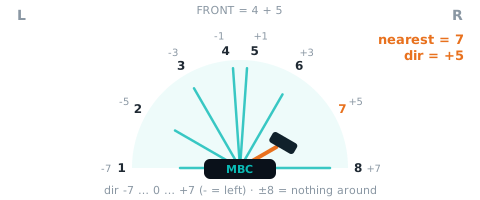
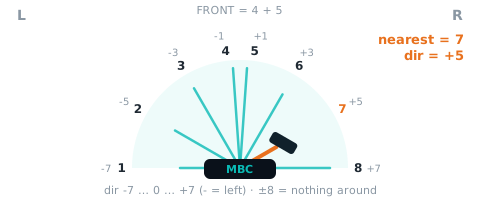
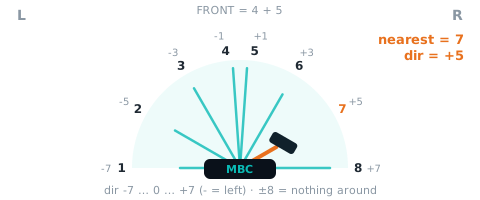
| Meaning | direction of the nearest object: −7 (left) to +7 (right), 0 = straight ahead, negative = left; ±8 = nothing around (keeps the last side) |
| Range | -8~+8 |
| I2C / mBlock id | 02 |
| Locked | 🔒 LEGO mode layout will not change |
How to read it
SPIKE
mode 1 byte 0 −8; mode 3 byte 0 −8; mode 4 v[0] lo −8; mode 5 v[0] 🔒; mode 6 v[2]; mode 9 v[4] lo −8 🔒. Note: 原始方位 016(8 = 正前); Pybricks reflection() 編碼:x = 方位−8,負數 +6399,a = x/25、b = 10×(x mod 25)+9,3 個 int16 = a×256+b → reflection() 向零截斷 = −8+8(INO:319-336); #67 新:HSV 3×int16 = [最近 mm, 正前方 mm, 最近方向 −8~+8]
from pybricks.iodevices import PUPDevice
from pybricks.parameters import Port

dev = PUPDevice(Port.A)   # sensor on port A

w = dev.read(9)[4]
nearDir = (w & 0xFF) - 8   # nearest direction(lo byte)
MBC library
from pybricks.parameters import Port
from MBC_laser8_obj_Lib import MBC_LASER8

laser = MBC_LASER8(Port.A)
nearDir = laser.min_direction()
EV3
mode 2 · int8 · int8 二補數(方位−8); mode 5 · int16 · #67 新:IR-CAL 2×int16 = [最近 mm, 最近方向 −8~+8](原本 = 前 4 顆兩兩合併) (locked mode: firmware and hosts will not change it)
from pybricks.iodevices import LUMPDevice
from pybricks.parameters import Port

sensor = LUMPDevice(Port.S1)   # sensor on port 1

nearDir = sensor.read(2)[0]   # nearest direction:-8~+8
nearDir = sensor.read(5)[1]   # nearest direction:-8~+8
' clev3r (BASIC)
Sensor.SetMode(1, 2)
nearDir = Sensor.ReadRawValue(1, 0)
Sensor.SetMode(1, 5)
nearDir = Sensor.ReadRawValue(1, 1)Arduino I2C
Returns MBC_NONE (−32768) when the module does not answer.
int16_t nearDir = mbcRead(0x29, 0x02); // nearest direction:-8~+8mBlock
Block returns nearest direction(-8~+8)。Host sends [02] → reply [lo][hi][02 ^ lo ^ hi], value = int16 little-endian.
(Ranger 8 port [1 v] nearest direction :: sensing)
MATRIX
Not available with the stock MATRIX 0x22 blocks.
micro:bit
Returns 0 when the sensor does not answer; check with "device at … is ready" first.
(distance 8-ch nearest direction :: #00A4E4)
let nearDir = mbc.tof8NearestDirection() // nearest direction:-8~+803 farthest distance (cm) farCm
| Item | Detail |
|---|---|
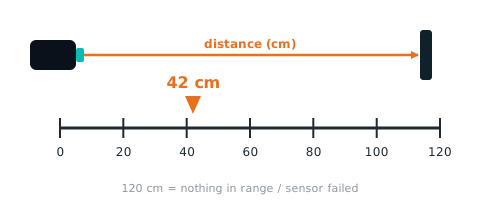
| Meaning | largest of the 8 distances, 0~120 cm (a failed sensor always reads 120 and looks 'farthest') |
| Range | 0~120 cm |
| I2C / mBlock id | 03 |
| Locked | 🔒 LEGO mode layout will not change |
How to read it
SPIKE
mode 9 v[5] hi 🔒
from pybricks.iodevices import PUPDevice
from pybricks.parameters import Port

dev = PUPDevice(Port.A)   # sensor on port A

w = dev.read(9)[5]
farCm = ((w >> 8) & 0xFF)   # farthest distance (cm)(hi byte)
MBC library
from pybricks.parameters import Port
from MBC_laser8_obj_Lib import MBC_LASER8

laser = MBC_LASER8(Port.A)
farCm = laser.max_distance()
EV3
mode 2 · int8 (locked mode: firmware and hosts will not change it)
from pybricks.iodevices import LUMPDevice
from pybricks.parameters import Port

sensor = LUMPDevice(Port.S1)   # sensor on port 1

farCm = sensor.read(2)[3]   # farthest distance (cm):cm×100/120 (0~100)
' clev3r (BASIC)
Sensor.SetMode(1, 2)
farCm = Sensor.ReadRawValue(1, 3)Arduino I2C
Returns MBC_NONE (−32768) when the module does not answer.
int16_t farCm = mbcRead(0x29, 0x03); // farthest distance (cm):0~120 cmmBlock
Block returns farthest distance (cm)(0~120 cm)。Host sends [03] → reply [lo][hi][03 ^ lo ^ hi], value = int16 little-endian.
(Ranger 8 port [1 v] farthest distance cm :: sensing)
MATRIX
Not available with the stock MATRIX 0x22 blocks.
micro:bit
Returns 0 when the sensor does not answer; check with "device at … is ready" first.
(distance 8-ch most open \(cm\) :: #00A4E4)
let farCm = mbc.tof8OpenCm() // farthest distance (cm):0~120 cm04 farthest direction farDir
| Item | Detail |
|---|---|
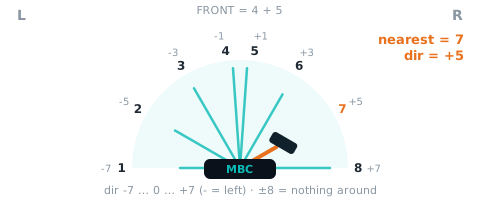
| Meaning | direction of the most open side: −7 to +7, 0 = straight ahead, negative = left; 0 when all 8 read 120 |
| Range | -7~+7 |
| I2C / mBlock id | 04 |
| Locked | 🔒 LEGO mode layout will not change |
How to read it
SPIKE
mode 9 v[5] lo −8 🔒
from pybricks.iodevices import PUPDevice
from pybricks.parameters import Port

dev = PUPDevice(Port.A)   # sensor on port A

w = dev.read(9)[5]
farDir = (w & 0xFF) - 8   # farthest direction(lo byte)
MBC library
from pybricks.parameters import Port
from MBC_laser8_obj_Lib import MBC_LASER8

laser = MBC_LASER8(Port.A)
farDir = laser.max_direction()
EV3
mode 2 · int8 · int8 二補數(方位−8) (locked mode: firmware and hosts will not change it)
from pybricks.iodevices import LUMPDevice
from pybricks.parameters import Port

sensor = LUMPDevice(Port.S1)   # sensor on port 1

farDir = sensor.read(2)[2]   # farthest direction:-7~+7
' clev3r (BASIC)
Sensor.SetMode(1, 2)
farDir = Sensor.ReadRawValue(1, 2)Arduino I2C
Returns MBC_NONE (−32768) when the module does not answer.
int16_t farDir = mbcRead(0x29, 0x04); // farthest direction:-7~+7mBlock
Block returns farthest direction(-7~+7)。Host sends [04] → reply [lo][hi][04 ^ lo ^ hi], value = int16 little-endian.
(Ranger 8 port [1 v] farthest direction :: sensing)
MATRIX
Not available with the stock MATRIX 0x22 blocks.
micro:bit
Returns 0 when the sensor does not answer; check with "device at … is ready" first.
(distance 8-ch most open direction :: #00A4E4)
let farDir = mbc.tof8OpenDirection() // farthest direction:-7~+705 front distance (cm) frontCm
| Item | Detail |
|---|---|
| Meaning | average of sensors 4 and 5 (both facing forward), 0~120 cm; EV3 mode 3 and SPIKE mode 6 carry the same thing in mm; 0x22 'C' is min(4, 5), not the average (see 10) |
| Range | 0~120 cm |
| I2C / mBlock id | 05 |
How to read it
SPIKE
Not sent in any SPIKE mode (locked modes stay as they are). Use Arduino I2C / mBlock if you need it.
EV3
mode 0 · int8 · IR-PROX = (第 4'+第 5')>>1(鎖住,INO:148-150) (locked mode: firmware and hosts will not change it)
from pybricks.iodevices import LUMPDevice
from pybricks.parameters import Port

sensor = LUMPDevice(Port.S1)   # sensor on port 1

frontCm = sensor.read(0)[0]   # front distance (cm):cm×100/120 (0~100)
' clev3r (BASIC)
Sensor.SetMode(1, 0)
frontCm = Sensor.ReadRawValue(1, 0)Arduino I2C
Returns MBC_NONE (−32768) when the module does not answer.
int16_t frontCm = mbcRead(0x29, 0x05); // front distance (cm):0~120 cmmBlock
Block returns front distance (cm)(0~120 cm)。Host sends [05] → reply [lo][hi][05 ^ lo ^ hi], value = int16 little-endian.
(Ranger 8 port [1 v] front distance cm :: sensing)
MATRIX
Not available with the stock MATRIX 0x22 blocks.
micro:bit
Returns 0 when the sensor does not answer; check with "device at … is ready" first.
(distance 8-ch front \([cm v]\) :: #00A4E4)
let frontCm = mbc.tof8Front(MbcDistUnit.Cm) // front distance (cm):0~120 cm06 nearest distance (mm) nearMm
| Item | Detail |
|---|---|
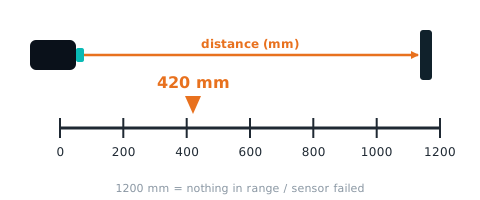
| Meaning | smallest of the 8 mm readings, 0~1200 (failed sensor counts as 1200); 1200 = nothing around |
| Range | 0~1200 mm |
| I2C / mBlock id | 06 |
How to read it
SPIKE
mode 6 v[0]. Note: #67 新:[最近 mm, 正前方 mm, 方向]
from pybricks.iodevices import PUPDevice
from pybricks.parameters import Port

dev = PUPDevice(Port.A)   # sensor on port A

nearMm = dev.read(6)[0]   # nearest distance (mm)
MBC library
from pybricks.parameters import Port
from MBC_laser8_obj_Lib import MBC_LASER8

laser = MBC_LASER8(Port.A)
nearMm = laser.nearest_mm()
EV3
mode 5 · int16 · #67 新:[最近 mm, 最近方向]
from pybricks.iodevices import LUMPDevice
from pybricks.parameters import Port

sensor = LUMPDevice(Port.S1)   # sensor on port 1

nearMm = sensor.read(5)[0]   # nearest distance (mm):0~1200 mm
' clev3r (BASIC)
Sensor.SetMode(1, 5)
nearMm = Sensor.ReadRawValue(1, 0)Arduino I2C
Returns MBC_NONE (−32768) when the module does not answer.
int16_t nearMm = mbcRead(0x29, 0x06); // nearest distance (mm):0~1200 mmmBlock
Block returns nearest distance (mm)(0~1200 mm)。Host sends [06] → reply [lo][hi][06 ^ lo ^ hi], value = int16 little-endian.
(Ranger 8 port [1 v] nearest distance mm :: sensing)
MATRIX
Not available with the stock MATRIX 0x22 blocks.
micro:bit
Returns 0 when the sensor does not answer; check with "device at … is ready" first.
(distance 8-ch nearest \([mm v]\) :: #00A4E4)
let nearMm = mbc.tof8Nearest(MbcDistUnit.Mm) // nearest distance (mm):0~1200 mm07 init bitmap initOk
| Item | Detail |
|---|---|
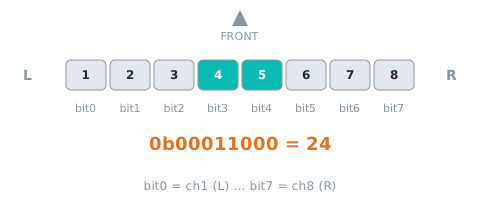
| Meaning | bit0 = sensor 1 (left) … bit7 = sensor 8; 1 = initialised at power-on (8 sensors take |
| Range | 0~255 bit |
| I2C / mBlock id | 07 |
| Locked | 🔒 LEGO mode layout will not change |
How to read it
SPIKE
mode 9 v[6] lo 🔒
from pybricks.iodevices import PUPDevice
from pybricks.parameters import Port

dev = PUPDevice(Port.A)   # sensor on port A

w = dev.read(9)[6]
initOk = (w & 0xFF)   # init bitmap(lo byte)
MBC library
from pybricks.parameters import Port
from MBC_laser8_obj_Lib import MBC_LASER8

laser = MBC_LASER8(Port.A)
initOk = laser.is_ok(1)
EV3
Not sent in any EV3 mode (the locked EV3 modes stay as they are). Use Arduino I2C / mBlock if you need it.
Arduino I2C
Returns MBC_NONE (−32768) when the module does not answer.
int16_t initOk = mbcRead(0x29, 0x07); // init bitmap:0~255 bitmBlock
Block returns init bitmap(0~255 bit)。Host sends [07] → reply [lo][hi][07 ^ lo ^ hi], value = int16 little-endian.
(Ranger 8 port [1 v] init bitmap :: sensing)
MATRIX
Not available with the stock MATRIX 0x22 blocks.
micro:bit
No dedicated block; in JavaScript read it with mbc.readValue(address, id) (−32768 when nothing answers). Related block: "distance 8-ch sensor 1 is OK".
let initOk = mbc.readValue(0x29, 0x07) // init bitmap:0~255 bit08 fault bitmap fault
| Item | Detail |
|---|---|
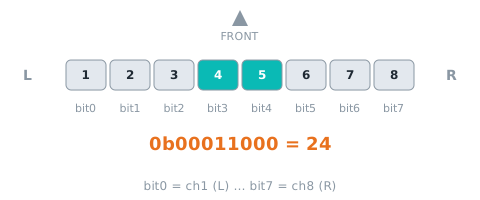
| Meaning | bit0 = sensor 1 … bit7 = sensor 8; 1 = currently failing (I2C error or no update for 200 ms); its distance reads 120 / 1200 |
| Range | 0~255 bit |
| I2C / mBlock id | 08 |
| Locked | 🔒 LEGO mode layout will not change |
How to read it
SPIKE
mode 9 v[6] hi 🔒
from pybricks.iodevices import PUPDevice
from pybricks.parameters import Port

dev = PUPDevice(Port.A)   # sensor on port A

w = dev.read(9)[6]
fault = ((w >> 8) & 0xFF)   # fault bitmap(hi byte)
MBC library
from pybricks.parameters import Port
from MBC_laser8_obj_Lib import MBC_LASER8

laser = MBC_LASER8(Port.A)
fault = laser.is_ok(1)
EV3
Not sent in any EV3 mode (the locked EV3 modes stay as they are). Use Arduino I2C / mBlock if you need it.
Arduino I2C
Returns MBC_NONE (−32768) when the module does not answer.
int16_t fault = mbcRead(0x29, 0x08); // fault bitmap:0~255 bitmBlock
Block returns fault bitmap(0~255 bit)。Host sends [08] → reply [lo][hi][08 ^ lo ^ hi], value = int16 little-endian.
(Ranger 8 port [1 v] fault bitmap :: sensing)
MATRIX
Not available with the stock MATRIX 0x22 blocks.
micro:bit
No dedicated block; in JavaScript read it with mbc.readValue(address, id) (−32768 when nothing answers). Related block: "distance 8-ch sensor 1 is OK".
let fault = mbc.readValue(0x29, 0x08) // fault bitmap:0~255 bit09 front distance (mm) frontMm
| Item | Detail |
|---|---|
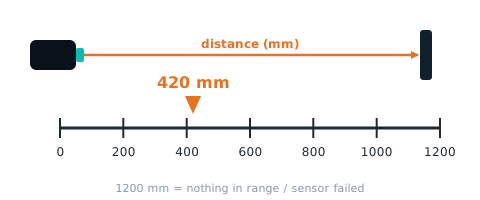
| Meaning | average of sensors 4 and 5 (the two facing forward), 0~1200 mm; 1200 = nothing ahead. cm version is 05 |
| Range | 0~1200 mm |
| I2C / mBlock id | 09 |
How to read it
SPIKE
mode 6 v[1]. Note: #67 新:正前方 mm
from pybricks.iodevices import PUPDevice
from pybricks.parameters import Port

dev = PUPDevice(Port.A)   # sensor on port A

frontMm = dev.read(6)[1]   # front distance (mm)
MBC library
from pybricks.parameters import Port
from MBC_laser8_obj_Lib import MBC_LASER8

laser = MBC_LASER8(Port.A)
frontMm = laser.front_mm()
EV3
mode 3 · int16 · #67 新:IR-REM-A 1×int16 = 正前方(第 4、5 顆平均)mm(原本 = 第 1 顆 0~100)
from pybricks.iodevices import LUMPDevice
from pybricks.parameters import Port

sensor = LUMPDevice(Port.S1)   # sensor on port 1

frontMm = sensor.read(3)[0]   # front distance (mm):mm (0~1200)
' clev3r (BASIC)
Sensor.SetMode(1, 3)
frontMm = Sensor.ReadRawValue(1, 0)Arduino I2C
Returns MBC_NONE (−32768) when the module does not answer.
int16_t frontMm = mbcRead(0x29, 0x09); // front distance (mm):0~1200 mmmBlock
Block returns front distance (mm)(0~1200 mm)。Host sends [09] → reply [lo][hi][09 ^ lo ^ hi], value = int16 little-endian.
(Ranger 8 port [1 v] front distance mm :: sensing)
MATRIX
Not available with the stock MATRIX 0x22 blocks.
micro:bit
Returns 0 when the sensor does not answer; check with "device at … is ready" first.
(distance 8-ch front \([mm v]\) :: #00A4E4)
let frontMm = mbc.tof8Front(MbcDistUnit.Mm) // front distance (mm):0~1200 mm10~17 sensor 1~8 distance (cm) distCm
| Item | Detail |
|---|---|
| Meaning | distance of each sensor 1 |
| Range | 0~120 cm |
| I2C / mBlock id | 10~17 |
| Locked | 🔒 LEGO mode layout will not change |
How to read it
SPIKE
mode 0 (edu) byte 0 🔒; mode 0 (toy) byte 0 🔒; mode 3 byte 2; mode 4 v[1]; mode 8 v[0]; mode 9 v[0] 🔒. Note: 16 B = [第 18 顆, 0×8]:App 顏色 = 第 1 顆、反射光 = 第 2 顆、原始紅 = 第 3+256×第 4 …; byte0/1 = 第 1、2 顆 ×10/120(010);byte27 = 第 38 顆兩顆一組 4-bit 再查表編碼(spikeEncodeU8,INO:259-284); byte2 = 第 1 顆(byte3 = 第 8 顆被描述表砍掉); v1 = 第 1 顆 + 256×第 8 顆; 只送 4 B:v0 = 第 1+256×第 2、v1 = 第 3+256×第 4; 每 int16 兩顆:lo = 第 2k+1 顆、hi = 第 2k+2 顆(v0v3 = 第 18 顆)
from pybricks.iodevices import PUPDevice
from pybricks.parameters import Port

dev = PUPDevice(Port.A)   # sensor on port A

words = dev.read(9)[0:4]
distCm = []
for w in words:
    distCm.append(w & 0xFF)          # odd channel
    distCm.append((w >> 8) & 0xFF)   # even channel
MBC library
from pybricks.parameters import Port
from MBC_laser8_obj_Lib import MBC_LASER8

laser = MBC_LASER8(Port.A)
distCm = laser.distances()   # list, channel 1 = [0]
EV3
mode 1 · int8 · IR-SEEK 8×int8 = 第 18 顆(EV3 視為頻道 14 的〈方位,距離〉); mode 4 · int8 · IR-S-ALT = 前 4 顆 (locked mode: firmware and hosts will not change it)
from pybricks.iodevices import LUMPDevice
from pybricks.parameters import Port

sensor = LUMPDevice(Port.S1)   # sensor on port 1

distCm = sensor.read(1)[0:8]   # sensor 1~8 distance (cm)
distCm = sensor.read(4)[0:4]   # sensor 1~8 distance (cm)
' clev3r (BASIC)
Sensor.SetMode(1, 1)
distCm1 = Sensor.ReadRawValue(1, 0) ' first; for the N-th use 0 + N - 1
Sensor.SetMode(1, 4)
distCm1 = Sensor.ReadRawValue(1, 0) ' first; for the N-th use 0 + N - 1Arduino I2C
Ids 0x10~0x17 are consecutive: one mbcReadMany call returns them from the same 10 ms snapshot.
int16_t distCm[8];
mbcReadMany(0x29, 0x10, 8, distCm);   // sensor 1~8 distance (cm):0~120 cm
for (uint8_t i = 0; i < 8; i++) { Serial.print(distCm[i]); Serial.print(' '); }
Serial.println();
mBlock
Block returns sensor 18 distance (cm)(0120 cm)。Host sends [10] → reply [lo][hi][10 ^ lo ^ hi], value = int16 little-endian; channel N uses id 0x10 + (N − 1).
(Ranger 8 port [1 v] sensor [1 v] distance cm :: sensing)
MATRIX
0x22 R~K.
// A. stock 0x22 blocks:R~K = sensor 1~8 distance (cm)(#67 改(使用者最終定案):R、G、B = 第 1、2、3 顆;C = min(第 4, 第 5 顆)(正前方取較近);M、Y、K = 第 6、7、8 顆;全部 cm 0~120;11、12 = 0)
int raw = MiniR4.I2C1.MXColor.getColor(R);   // group 1
micro:bit
Returns 0 when the sensor does not answer; check with "device at … is ready" first.
(distance 8-ch sensor (1) \([cm v]\) :: #00A4E4)
let distCm = mbc.tof8Sensor(1, MbcDistUnit.Cm) // sensor 1~8 distance (cm):0~120 cm (N = 1~8)18~1F sensor 1~8 distance (mm) distMm
| Item | Detail |
|---|---|
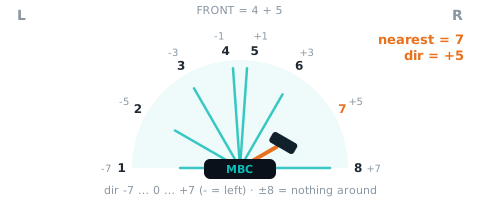
| Meaning | distance of each sensor 1 |
| Range | 0~1200 mm |
| I2C / mBlock id | 18~1F |
How to read it
SPIKE
Not sent in any SPIKE mode (locked modes stay as they are). Use Arduino I2C / mBlock if you need it.
EV3
Not sent in any EV3 mode (the locked EV3 modes stay as they are). Use Arduino I2C / mBlock if you need it.
Arduino I2C
Ids 0x18~0x1F are consecutive: one mbcReadMany call returns them from the same 10 ms snapshot.
int16_t distMm[8];
mbcReadMany(0x29, 0x18, 8, distMm);   // sensor 1~8 distance (mm):0~1200 mm
for (uint8_t i = 0; i < 8; i++) { Serial.print(distMm[i]); Serial.print(' '); }
Serial.println();
mBlock
Block returns sensor 18 distance (mm)(01200 mm)。Host sends [18] → reply [lo][hi][18 ^ lo ^ hi], value = int16 little-endian; channel N uses id 0x18 + (N − 1).
(Ranger 8 port [1 v] sensor [1 v] distance mm :: sensing)
MATRIX
Not available with the stock MATRIX 0x22 blocks.
micro:bit
Returns 0 when the sensor does not answer; check with "device at … is ready" first.
(distance 8-ch sensor (1) \([mm v]\) :: #00A4E4)
let distMm = mbc.tof8Sensor(1, MbcDistUnit.Mm) // sensor 1~8 distance (mm):0~1200 mm (N = 1~8)Status flags F3
One status per bit of F3; read directly over I2C, mBlock, micro:bit.
| bit | Name | Meaning |
|---|---|---|
| b0 | ready (ready) |
1 once all 8 sensors are initialised ( |
| b1 | any sensor failed (fault) |
1 if any sensor failed to initialise, has an I2C error or no update for 200 ms (08 ≠ 0 or 07 ≠ 255) |
SPIKE
SPIKE has no F3 flags; mode 8 returns ID / version. The official app cannot read mode 8.
from pybricks.iodevices import PUPDevice
from pybricks.parameters import Port

dev = PUPDevice(Port.A)   # sensor on port A

id_word, proto, fw, seq = dev.read(8)   # mode 8: [ID | hw0<<8, protocol 2, major×100+minor, counter]
addr = id_word & 0xFF   # 0x29
hw0 = id_word >> 8      # 8
EV3
EV3 has no F3 flags; mode 5 returns the device ID and firmware version (ID format B).
from pybricks.iodevices import LUMPDevice
from pybricks.parameters import Port

sensor = LUMPDevice(Port.S1)   # sensor on port 1

id_word, fw = sensor.read(5)   # mode 5: [ID | hw0<<8, major×100+minor]
addr = id_word & 0xFF             # 0x29
hw0 = id_word >> 8                # 8
Arduino I2C
int16_t st = mbcRead(0x29, 0xF3);
bool ready = st & (1 << 0);   // ready
bool fault = st & (1 << 1);   // any sensor failed
mBlock
The extension splits status flags F3 into boolean blocks (ready, calibrating, …).
MATRIX
The status flags are not available with the stock MATRIX 0x22 blocks.
micro:bit
let ready = mbc.deviceReady(0x29)   // F3 bit0; false when nothing answers
let st = mbc.status(0x29)   // F3
Shared registers and commands
Identical on every product, documented once in the universal I2C protocol:
| Id | Name | Meaning |
|---|---|---|
F0 |
device ID | low byte = factory I2C address (unchanged after re-addressing), high byte = hw[0] (channels / sensors / variant) |
F1 |
protocol version | 2 for this release (same number reported in SPIKE mode 8 v[1]) |
F2 |
firmware version | major×100 + minor (e.g. 102 = 1.2) |
F3 |
status flags | b0 = ready; other bits per product (see flags) |
F4 |
update counter | +1 every 10 ms snapshot, wraps 0~255 (2.56 s per cycle, not usable for reboot detection; frozen = module busy) |
F5 |
uptime seconds | seconds since boot, saturates at 32767 (~9 h); a drop means the module rebooted |
F8 |
change I2C address | [F8][new 0x08 |
EF |
reboot | [EF][0xA5]; mBlock sends ACK first, then reboots |
Sources and assumptions
Generated by _build/gen-reference.mjs from _build/protocol/tof8.json (single source of truth, transcribed from the 2026-10-21 protocol decisions).
- 正前方 mm(EV3 模式 3、SPIKE 模式 6 v[1])在定案 §5 沒有獨立 I2C 編號 → 掛在 05 正前方 cm 底下,用 scale:mm 標示,不自己加編號。
- 0x22(使用者 2026-10-21 最終定案):只用一個位址,R~K 由左到右 7 個 cm:第 1、2、3 顆、min(第 4, 第 5)、第 6、7、8 顆;11、12 不放資料;最近距離/方向由主機自己比較。此排法只用在 0x22,EV3/SPIKE不動。
- SPIKE:0/5/7/9 鎖住,1、2、3、4、8 維持不動;模式 6 改 [最近 mm, 正前方 mm, 最近方向 −8
+8](原本 = 第 27 顆兩兩合併);模式 8 v[0] 改 ID|hw[0]<<8。 - 最空曠方向 04 範圍 −7~+7(maxDirection 永遠不會是 0/16,盤點 INO:1086-1088);最近方向 02 ±8 = 沒目標、沿用上次偏向側,開機預設 −8。
- 沒有寫入命令;F8 換位址/EF 重開機用共用的。
- 主對話 2026-10-21:補 09 正前方 mm(定案 §5 只有 05 正前方 cm,但 EV3 模式 3、SPIKE 模式 6 都送 mm,I2C/mBlock 應有同一個值)。