
MBC EXP6 6-Port Motor Expander (for LEGO® SPIKE™)
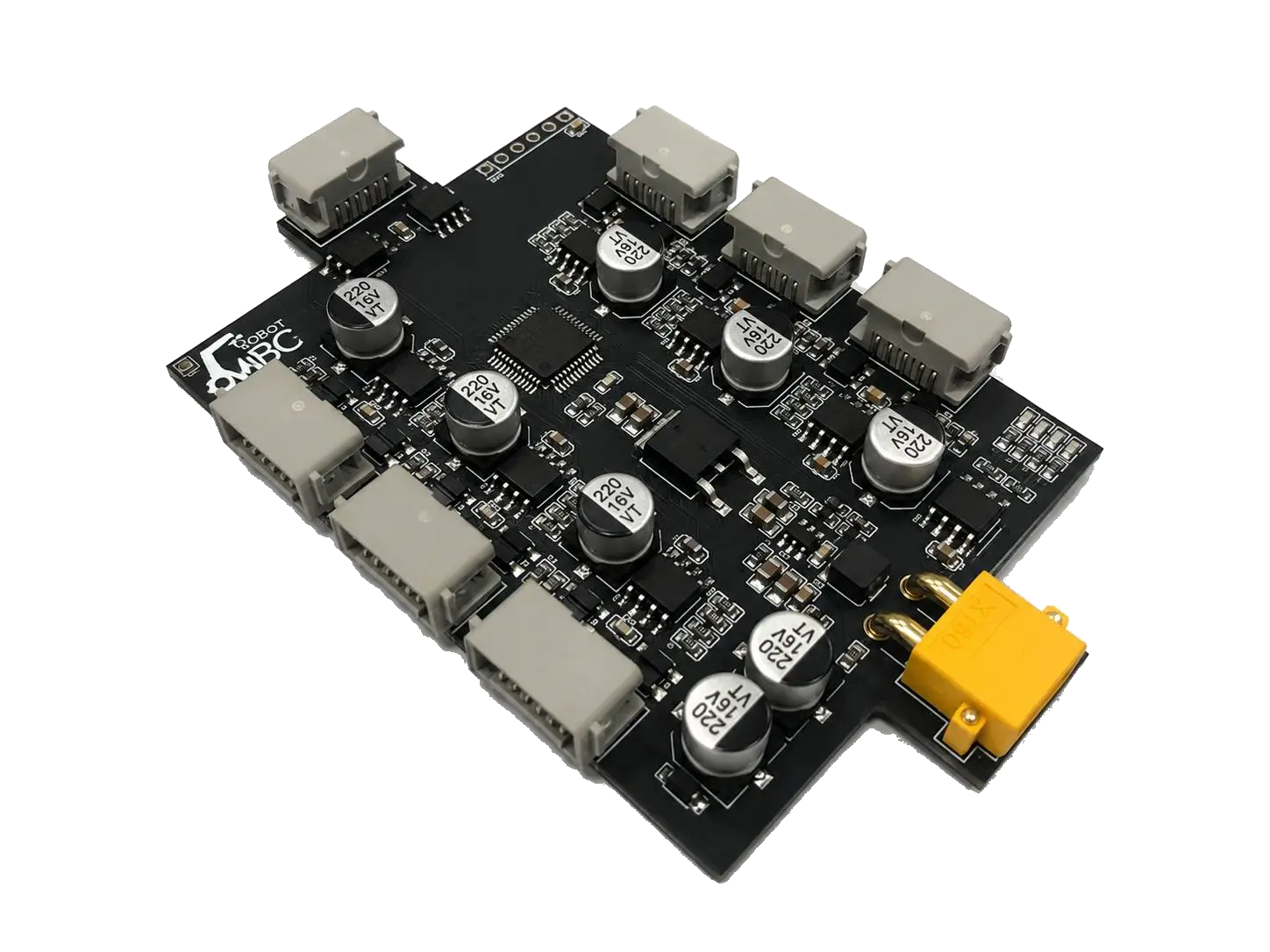
Out of ports on SPIKE Prime? Run 6 motors and sensors from one port, with its own isolated power and on-board motor PID.
MSRP US$145 (shipping not included)
| Editions | Official SPIKE App, Pybricks, Robot Inventor App |
|---|---|
| Power | Motors powered by an external 2S LiPo battery (not included; do not use 3S or higher) |
| Controller | SPIKE™ Prime; Robot Inventor (51515) with Python in the Robot Inventor App only (not EV3) |
| Warranty | 6 months |
WRO RoboMission: allowed in all age groups; motors on the expander count toward the motor limit
WRO rules check · Other competitions · Where to buy
① Pick your host
Only hosts this product supports are listed; pick one, then your software, and the page covers just that software.
Interactive tutorial
No hub needed: click through it in your browser. Pick a function on the left, watch the code or blocks build up on the right, and drag the simulated sensor to see the values.
SPIKEMicroPython (Pybricks)Pybricks blocksMBC Blocks websiteLEGO SPIKE AppLEGO MINDSTORMS Robot Inventor App Python
Important
Important Notice on Purchase and Compatibility This expander is designed EXCLUSIVELY for the SPIKE series, featuring the LPF2 (Lego 6-pin) interface. It works with the SPIKE Prime hub, and with the Robot Inventor (51515) hub through Python in the Robot Inventor App only (guide, interactive tutorial). It DOES NOT support EV3 hubs!
Product Overview: Break the Port Limit
The SPIKE Prime hub only has 6 connection ports, but advanced robotics projects often require multiple sensors and motors simultaneously, making the ports insufficient.
The MBC EXP6 6-Port Motor Expander (for LEGO® SPIKE™) allows you to connect up to 6 sensors or motors using just a single port. It is not just a "splitter", but a "smart controller" with a built-in high-performance processor. It can independently calculate PID angle control for motors, significantly reducing the computing load on the SPIKE hub; more importantly, this product features an independent isolated power supply system. The large current required by the motors will not be drawn from the main hub, completely eliminating the fatal flaw of hub crashes or burnouts caused by motor power consumption!
Core Hardware Features
Independent Isolated Power
The motor driving current is completely supplied by EXP6's own 2S LiPo battery, and the signal lines to the SPIKE hub are fully electrically isolated by an isolation chip. This protects your expensive hub from abnormal large currents, ensuring crash-free competitions.
On-board Edge Computing
A built-in high-performance microcontroller silently runs 6-channel motor PID absolute angle calculations and motor synchronization in the background. The SPIKE hub only needs to issue a command, and the expander handles all the precise control.
Extreme 1-Wire 6-Channel Comm
Utilizing a custom high-speed data flow protocol, the hub can receive 32-bit data packets from all 6 sensors in a single cycle, achieving near-zero latency multi-sensor sampling.
Watchdog Protection (Pybricks)
In the Pybricks environment, if the expander receives no signal from the hub for about 0.5 seconds (disconnection or program crash), it lets the motors coast to a stop to prevent runaways. The official SPIKE App has no watchdog — always end your program with stop_all(1).
Hardware Wiring & Startup
- Hub Communication Connection: Plug the "Host Comm Cable" of the expander into any port (Port A~F) of the SPIKE hub.
- Connect a 2S LiPo Battery: The expander must have a 2S LiPo (7.4 V, 8.4 V fully charged, XT30 connector). Both the motors and the LEGO sensors are powered by this battery, not by the hub. Do not use 3S or higher, or a wall adapter: above 9 V, EXP6 cuts power to LEGO Color / Ultrasonic sensors.
- Connect Devices: Plug your LEGO sensors (color, ultrasonic, force) and motors into any of the ports 1~6 on the expander.
- Ready to Code!
On-board LEDs
Battery LEDs (4 LEDs, top to bottom: LED1, LED2, LED3, red): the level fills from the bottom up; LED3, right next to the red LED, is the first bar. The levels are scaled for a 2S LiPo. The voltage is smoothed over about 4 seconds, and moving up a bar needs an extra 0.1 V, so the LEDs do not flicker between levels.
| Battery voltage (2S) | Red | LED3 | LED2 | LED1 (top) |
|---|---|---|---|---|
| Below 6.9 V | Slow blink (almost empty, please charge) | Off | Off | See link status |
| 6.9~7.2 V | On | Off | Off | See link status |
| 7.2~7.5 V | Off | On | Off | See link status |
| 7.5~7.8 V | Off | On | On | See link status |
| 7.8 V and above | Off | On | On | On |
LED1 also shows the link status (link status takes priority over the battery level):
- Fast blink (0.1 s) = waiting for the hub handshake. With Pybricks, EXP6 only connects when the program reaches
MBC_EXP6(...), so fast blinking after power-on, before any program runs, is normal. - Slow blink (0.5 s) = in Pybricks mode, no data from the hub for more than 0.5 s (the program ended or the stop button was pressed); the watchdog has already let the motors coast to a stop.
- Otherwise = the third battery bar (on at 7.8 V and above).
Port LEDs (6 LEDs, port k lights LED k):
| Port LED | Meaning |
|---|---|
| Off | Empty port |
| Fast blink | Handshaking with the device |
| Steady on | Connected |
| Slow blink | The motor on this port is running a move |
Choose Your Software Environment (Dual Ecosystem Support)
The greatest feature of the EXP6 expander is its "Perfect Dual Ecosystem Support". Please select the software platform you are currently using to view the dedicated connection guide and API documentation:

Official SPIKE App
Supports the official Python environment.
Features synchronous (Sync) execution and a simple, intuitive object-oriented design, perfect for beginners and education!

Pybricks Pro Environment
Built for competitions and extreme performance.
Natively supports asynchronous multitasking (Async/await) and blazing-fast RAW communication!
Interested in this sensor?
Ask us for pricing, bulk / school orders or distributor info. Our engineers reply within 3 business days.