
Line Follower 8-ch: value & command reference
Every value and command the Line Follower 8-ch reports to each host: what it means, its range, and how to read it on SPIKE / EV3 / Arduino I2C / mBlock / MATRIX / micro:bit. Append ?host=spike (or ev3, arduino, mblock, matrix, microbit) to the URL to expand that host by default.
SPIKEEV3Arduino I2CmBlockMATRIXmicro:bit
| Item | Detail |
|---|---|
| Factory I2C address | 0x16 |
| hw[0] | 8(F0 high byte; ID high byte in SPIKE mode 8 / EV3 mode 5) |
| Model | LINE8 |
| Protocol version | 2 |
| Hosts | SPIKE, EV3, Arduino I2C, mBlock, MATRIX, micro:bit |
Values at a glance
| Id | Value | Range | SPIKE | EV3 | Arduino I2C | mBlock | MATRIX | micro:bit |
|---|---|---|---|---|---|---|---|---|
01 |
line position | -8~+8 | ✓ | ✓ | ✓ | ✓ | ✓ | ✓ |
02 |
fine position | -100~+100 | ✓ | ✓ | ✓ | ✓ | ✓ | ✓ |
03 |
line width | 0~8 路 | ✓ | ✓ | ✓ | ✓ | ✓ | ✓ |
04 |
line segments | 0~4 | ✓ | — | ✓ | ✓ | — | ✓ |
05 |
line bitmap | 0~255 bit | ✓ | ✓ | ✓ | ✓ | — | ✓ |
06 |
last exit direction | -8~+8 | — | — | ✓ | ✓ | — | ✓ |
07 |
threshold | 1~99 | — | — | ✓ | ✓ | — | ✓ |
08 |
calibrations done | 0~255 次 | — | — | ✓ | ✓ | — | ✓ |
10~17 |
channel 1~8 reflect | 0~100 | ✓ | ✓ | ✓ | ✓ | ✓ | ✓ |
✓ = available on that host; — = not sent.
Reading each value
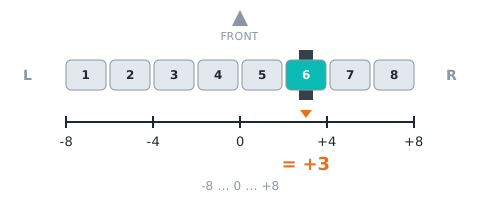
01 line position linePos
| Item | Detail |
|---|---|
| Meaning | which channel the line is under: −8 (far left) to +8 (far right), 0 = centre; seen from behind the robot, negative = left |
| Range | -8~+8 |
| I2C / mBlock id | 01 |
| Locked | 🔒 LEGO mode layout will not change |
How to read it
SPIKE
mode 0 (edu) byte 1 −8 🔒; mode 0 (toy) byte 0 −8 🔒; mode 1 byte 0 −8; mode 5 v[0] 🔒; mode 9 v[4] lo −8 🔒. Note: Pybricks reflection() 編碼:X = (線位置+8)×10 + 線寬(0168),共用核心 mbcReflFill8 送出:2026-11-01 以後的韌體 reflection() 剛好 = X(3.x、4.x 都是整數);舊韌體(R=G=B=a×256+b)在 4.x 帶 0.30.9 的小數,先 int()。主機 ÷10 取整−8 = 線位置、取餘數 = 線寬(INO:947-950)
from pybricks.iodevices import PUPDevice
from pybricks.parameters import Port

dev = PUPDevice(Port.A)   # sensor on port A

w = dev.read(9)[4]
linePos = (w & 0xFF) - 8   # line position(lo byte)
MBC library
from pybricks.parameters import Port
from MBC_line8_obj_Lib import MBC_LINE8

line = MBC_LINE8(Port.A)
linePos = line.pos8()
EV3
mode 0 · int8 · IR-PROX (locked mode: firmware and hosts will not change it)
from pybricks.iodevices import LUMPDevice
from pybricks.parameters import Port

sensor = LUMPDevice(Port.S1)   # sensor on port 1

linePos = sensor.read(0)[0]   # line position:-8~+8
' clev3r (BASIC)
Sensor.SetMode(1, 0)
linePos = Sensor.ReadRawValue(1, 0)Arduino I2C
Returns MBC_NONE (−32768) when the module does not answer.
int16_t linePos = mbcRead(0x16, 0x01); // line position:-8~+8mBlock
Block returns line position(-8~+8)。Host sends [01] → reply [lo][hi][01 ^ lo ^ hi], value = int16 little-endian.
(Pathfinder port [1 v] line position :: sensing)
MATRIX
0x22 R (+8).
// A. stock 0x22 blocks:R = line position + 8
int linePos = MiniR4.I2C1.MXColor.getColor(R) - 8;
micro:bit
Returns 0 when the sensor does not answer; check with "device at … is ready" first.
(line position :: #00A4E4)
let linePos = mbc.linePosition() // line position:-8~+8Related examples:Arduino example 03、EV3 example 02、SPIKE example 02
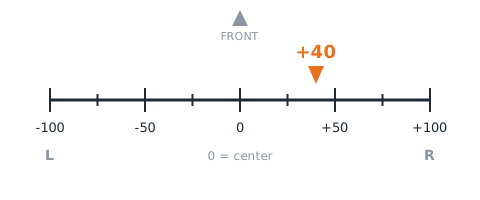
02 fine position linePosFine
| Item | Detail |
|---|---|
| Meaning | sub-channel position: −100 to +100, 0 = centre, negative = left (same sign as line position) |
| Range | -100~+100 |
| I2C / mBlock id | 02 |
| Locked | 🔒 LEGO mode layout will not change |
How to read it
SPIKE
mode 0 (edu) byte 2 −100 🔒; mode 3 byte 0 −100; mode 4 v[0] −100; mode 7 v[0] 🔒; mode 9 v[5] lo −100 🔒. Note: 4 個 int16:第 1、2、4 格 = (細位置+100)×100 + 線寬(0~20008;Pybricks hsv(surface=False).h 讀第 1 格,原封不動);第 3 格 = (細位置+100)×100 + min(線寬,9)×10(Pybricks ambient() 讀這格:4.1.2 先 ÷10 去尾再 ÷10、3.6.1/4.0.0 ÷100,都得到 細位置+100 . 線寬)。2026-10-30 起第 3 格改這個編碼
from pybricks.iodevices import PUPDevice
from pybricks.parameters import Port

dev = PUPDevice(Port.A)   # sensor on port A

w = dev.read(9)[5]
linePosFine = (w & 0xFF) - 100   # fine position(lo byte)
MBC library
from pybricks.parameters import Port
from MBC_line8_obj_Lib import MBC_LINE8

line = MBC_LINE8(Port.A)
linePosFine = line.pos100()
EV3
mode 2 · int8 · IR-REMOTE byte0 = highRes−100 存成 int8(F030 ev3Uart case 2),主機直接讀 (locked mode: firmware and hosts will not change it)
from pybricks.iodevices import LUMPDevice
from pybricks.parameters import Port

sensor = LUMPDevice(Port.S1)   # sensor on port 1

linePosFine = sensor.read(2)[0]   # fine position:-100~+100
' clev3r (BASIC)
Sensor.SetMode(1, 2)
linePosFine = Sensor.ReadRawValue(1, 0)Arduino I2C
Returns MBC_NONE (−32768) when the module does not answer.
int16_t linePosFine = mbcRead(0x16, 0x02); // fine position:-100~+100mBlock
Block returns fine position(-100~+100)。Host sends [02] → reply [lo][hi][02 ^ lo ^ hi], value = int16 little-endian.
(Pathfinder port [1 v] fine line position :: sensing)
MATRIX
0x22 B (+100).
// A. stock 0x22 blocks:B = fine position + 100
int linePosFine = MiniR4.I2C1.MXColor.getColor(B) - 100;
micro:bit
Returns 0 when the sensor does not answer; check with "device at … is ready" first.
(fine line position :: #00A4E4)
let linePosFine = mbc.linePositionFine() // fine position:-100~+100Related examples:Arduino example 06、EV3 example 04
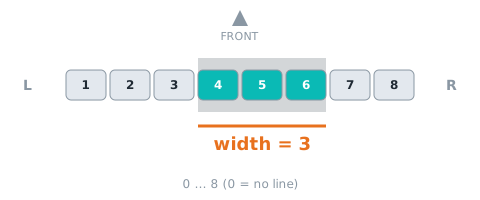
03 line width lineWidth
| Item | Detail |
|---|---|
| Meaning | number of channels on the line, 0~8; 0 = no line |
| Range | 0~8 路 |
| I2C / mBlock id | 03 |
| Locked | 🔒 LEGO mode layout will not change |
How to read it
SPIKE
mode 0 (edu) byte 0 🔒; mode 0 (toy) byte 1 🔒; mode 2 byte 0; mode 5 v[0] 🔒; mode 7 v[0] 🔒; mode 9 v[4] hi 🔒. Note: 跟線位置合在 reflection() 的個位數(見線位置); 跟細位置合在一起(見細位置):第 1、2、4 格是個位數(hsv(surface=False).h),第 3 格是十位數、最多 9(ambient() 的小數第 1 位)
from pybricks.iodevices import PUPDevice
from pybricks.parameters import Port

dev = PUPDevice(Port.A)   # sensor on port A

w = dev.read(9)[4]
lineWidth = ((w >> 8) & 0xFF)   # line width(hi byte)
MBC library
from pybricks.parameters import Port
from MBC_line8_obj_Lib import MBC_LINE8

line = MBC_LINE8(Port.A)
lineWidth = line.width()
EV3
mode 2 · int8 (locked mode: firmware and hosts will not change it)
from pybricks.iodevices import LUMPDevice
from pybricks.parameters import Port

sensor = LUMPDevice(Port.S1)   # sensor on port 1

lineWidth = sensor.read(2)[1]   # line width:0~8 路
' clev3r (BASIC)
Sensor.SetMode(1, 2)
lineWidth = Sensor.ReadRawValue(1, 1)Arduino I2C
Returns MBC_NONE (−32768) when the module does not answer.
int16_t lineWidth = mbcRead(0x16, 0x03); // line width:0~8 路mBlock
Block returns line width(0~8 路)。Host sends [03] → reply [lo][hi][03 ^ lo ^ hi], value = int16 little-endian.
(Pathfinder port [1 v] line width :: sensing)
MATRIX
0x22 G.
// A. stock 0x22 blocks:G = line width
int lineWidth = MiniR4.I2C1.MXColor.getColor(G);
micro:bit
Returns 0 when the sensor does not answer; check with "device at … is ready" first.
(line width :: #00A4E4)
let lineWidth = mbc.lineWidth() // line width:0~8 路Related examples:Arduino example 03、EV3 example 03
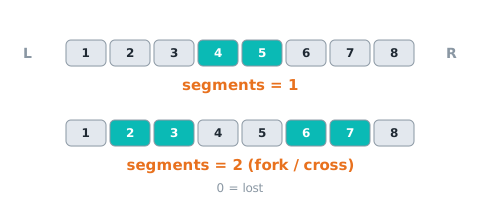
04 line segments groupCount
| Item | Detail |
|---|---|
| Meaning | number of separate line segments: 0 = lost, 1 = one line, ≥2 = fork / crossing |
| Range | 0~4 |
| I2C / mBlock id | 04 |
How to read it
SPIKE
mode 9 v[5] hi 🔒
from pybricks.iodevices import PUPDevice
from pybricks.parameters import Port

dev = PUPDevice(Port.A)   # sensor on port A

w = dev.read(9)[5]
groupCount = ((w >> 8) & 0xFF)   # line segments(hi byte)
MBC library
from pybricks.parameters import Port
from MBC_line8_obj_Lib import MBC_LINE8

line = MBC_LINE8(Port.A)
groupCount = line.junction()
EV3
Not sent in any EV3 mode (the locked EV3 modes stay as they are). Use Arduino I2C / mBlock if you need it.
Arduino I2C
Returns MBC_NONE (−32768) when the module does not answer.
int16_t groupCount = mbcRead(0x16, 0x04); // line segments:0~4mBlock
Block returns line segments(0~4)。Host sends [04] → reply [lo][hi][04 ^ lo ^ hi], value = int16 little-endian.
(Pathfinder port [1 v] line segments :: sensing)
MATRIX
Not available with the stock MATRIX 0x22 blocks.
micro:bit
Returns 0 when the sensor does not answer; check with "device at … is ready" first.
(line segments :: #00A4E4)
let groupCount = mbc.lineSegments() // line segments:0~4Related block "line is seen"
let lineSeen = mbc.lineSeen()Related block "on line [lost]"
mbc.onLineEvent(MbcLineEvent.Lost, function () {
})
Related examples:Arduino example 05
05 line bitmap bitmap
| Item | Detail |
|---|---|
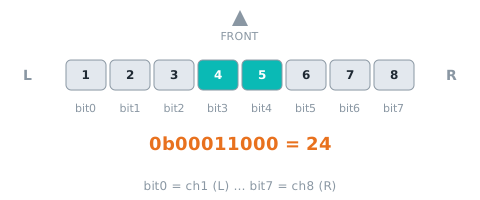
| Meaning | bit0 = channel 1 (left) … bit7 = channel 8; 1 = that channel sees the line |
| Range | 0~255 bit |
| I2C / mBlock id | 05 |
How to read it
SPIKE
mode 4 v[1]; mode 9 v[6] lo 🔒
from pybricks.iodevices import PUPDevice
from pybricks.parameters import Port

dev = PUPDevice(Port.A)   # sensor on port A

w = dev.read(9)[6]
bitmap = (w & 0xFF)   # line bitmap(lo byte)
MBC library
from pybricks.parameters import Port
from MBC_line8_obj_Lib import MBC_LINE8

line = MBC_LINE8(Port.A)
bitmap = line.bin_raw()
EV3
mode 3 · int16 · #67 新:IR-REM-A 1×int16
from pybricks.iodevices import LUMPDevice
from pybricks.parameters import Port

sensor = LUMPDevice(Port.S1)   # sensor on port 1

bitmap = sensor.read(3)[0]   # line bitmap:0~255 bit
' clev3r (BASIC)
Sensor.SetMode(1, 3)
bitmap = Sensor.ReadRawValue(1, 0)Arduino I2C
Returns MBC_NONE (−32768) when the module does not answer.
int16_t bitmap = mbcRead(0x16, 0x05); // line bitmap:0~255 bitmBlock
Block returns line bitmap(0~255 bit)。Host sends [05] → reply [lo][hi][05 ^ lo ^ hi], value = int16 little-endian.
(Pathfinder port [1 v] line bitmap :: sensing)
MATRIX
Not available with the stock MATRIX 0x22 blocks.
micro:bit
Returns 0 when the sensor does not answer; check with "device at … is ready" first.
(line bitmap :: #00A4E4)
let bitmap = mbc.lineBitmap() // line bitmap:0~255 bitRelated block "channel 1 is on the line"
let lineChannelOnLine = mbc.lineChannelOnLine(1)Related examples:Arduino example 05、EV3 example 06
06 last exit direction lastDir
| Item | Detail |
|---|---|
| Meaning | where the line was before it was lost: −8 to +8 (negative = left); keeps the last value |
| Range | -8~+8 |
| I2C / mBlock id | 06 |
How to read it
SPIKE
Not sent in any SPIKE mode (locked modes stay as they are). Use Arduino I2C / mBlock if you need it.
EV3
Not sent in any EV3 mode (the locked EV3 modes stay as they are). Use Arduino I2C / mBlock if you need it.
Arduino I2C
Returns MBC_NONE (−32768) when the module does not answer.
int16_t lastDir = mbcRead(0x16, 0x06); // last exit direction:-8~+8mBlock
Block returns last exit direction(-8~+8)。Host sends [06] → reply [lo][hi][06 ^ lo ^ hi], value = int16 little-endian.
(Pathfinder port [1 v] last exit direction :: sensing)
MATRIX
Not available with the stock MATRIX 0x22 blocks.
micro:bit
Returns 0 when the sensor does not answer; check with "device at … is ready" first.
(last exit direction :: #00A4E4)
let lastDir = mbc.lineLastDirection() // last exit direction:-8~+8Related examples:Arduino example 06
07 threshold threshold
| Item | Detail |
|---|---|
| Meaning | reflect threshold for 'on line', 1~99, default 50; set with E4 |
| Range | 1~99 |
| I2C / mBlock id | 07 |
How to read it
SPIKE
Not sent in any SPIKE mode (locked modes stay as they are). Use Arduino I2C / mBlock if you need it.
EV3
Not sent in any EV3 mode (the locked EV3 modes stay as they are). Use Arduino I2C / mBlock if you need it.
Arduino I2C
Returns MBC_NONE (−32768) when the module does not answer.
int16_t threshold = mbcRead(0x16, 0x07); // threshold:1~99mBlock
Block returns threshold(1~99)。Host sends [07] → reply [lo][hi][07 ^ lo ^ hi], value = int16 little-endian.
(Pathfinder port [1 v] threshold :: sensing)
MATRIX
Not available with the stock MATRIX 0x22 blocks.
micro:bit
Returns 0 when the sensor does not answer; check with "device at … is ready" first.
(line threshold :: #00A4E4)
let threshold = mbc.lineThreshold() // threshold:1~99Related examples:Arduino example 07
08 calibrations done calibCount
| Item | Detail |
|---|---|
| Meaning | number of calibrations completed since power-on (button calibrations included) |
| Range | 0~255 次 |
| I2C / mBlock id | 08 |
How to read it
SPIKE
Not sent in any SPIKE mode (locked modes stay as they are). Use Arduino I2C / mBlock if you need it.
EV3
Not sent in any EV3 mode (the locked EV3 modes stay as they are). Use Arduino I2C / mBlock if you need it.
Arduino I2C
Returns MBC_NONE (−32768) when the module does not answer.
int16_t calibCount = mbcRead(0x16, 0x08); // calibrations done:0~255 次mBlock
Block returns calibrations done(0~255 次)。Host sends [08] → reply [lo][hi][08 ^ lo ^ hi], value = int16 little-endian.
(Pathfinder port [1 v] calibration count :: sensing)
MATRIX
Not available with the stock MATRIX 0x22 blocks.
micro:bit
Returns 0 when the sensor does not answer; check with "device at … is ready" first.
(line calibration count :: #00A4E4)
let calibCount = mbc.lineCalibrationCount() // calibrations done:0~255 次Related block "line follower is calibrating"
let lineCalibrating = mbc.lineCalibrating()Related examples:Arduino example 04
10~17 channel 1~8 reflect light
| Item | Detail |
|---|---|
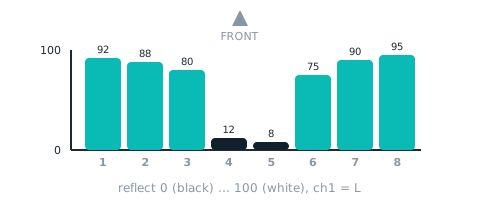
| Meaning | calibrated reflect of channel 1 |
| Range | 0~100 |
| I2C / mBlock id | 10~17 |
| Locked | 🔒 LEGO mode layout will not change |
How to read it
SPIKE
mode 0 (edu) byte 4 🔒; mode 9 v[0] 🔒. Note: 4-bit (v×10)>>6; 每 int16 兩路:lo = 奇數路、hi = 偶數路
from pybricks.iodevices import PUPDevice
from pybricks.parameters import Port

dev = PUPDevice(Port.A)   # sensor on port A

words = dev.read(9)[0:4]
light = []
for w in words:
    light.append(w & 0xFF)          # odd channel
    light.append((w >> 8) & 0xFF)   # even channel
MBC library
from pybricks.parameters import Port
from MBC_line8_obj_Lib import MBC_LINE8

line = MBC_LINE8(Port.A)
light = line.ir_calibration()   # list, channel 1 = [0]
EV3
mode 1 · int8 · IR-SEEK 8×int8 (locked mode: firmware and hosts will not change it)
from pybricks.iodevices import LUMPDevice
from pybricks.parameters import Port

sensor = LUMPDevice(Port.S1)   # sensor on port 1

light = sensor.read(1)[0:8]   # channel 1~8 reflect
' clev3r (BASIC)
Sensor.SetMode(1, 1)
light1 = Sensor.ReadRawValue(1, 0) ' first; for the N-th use 0 + N - 1Arduino I2C
Ids 0x10~0x17 are consecutive: one mbcReadMany call returns them from the same 10 ms snapshot.
int16_t light[8];
mbcReadMany(0x16, 0x10, 8, light);   // channel 1~8 reflect:0~100
for (uint8_t i = 0; i < 8; i++) { Serial.print(light[i]); Serial.print(' '); }
Serial.println();
mBlock
Block returns channel 18 reflect(0100)。Host sends [10] → reply [lo][hi][10 ^ lo ^ hi], value = int16 little-endian; channel N uses id 0x10 + (N − 1).
(Pathfinder port [1 v] channel [1 v] reflect :: sensing)
MATRIX
0x22 C~K.
// A. stock 0x22 blocks:C~K = channel 1~8 reflect(C~K 兩路一組 convert9×10+convert9)
int raw = MiniR4.I2C1.MXColor.getColor(C);   // group 1
micro:bit
Returns 0 when the sensor does not answer; check with "device at … is ready" first.
(channel (1) reflect :: #00A4E4)
let light = mbc.lineChannel(1) // channel 1~8 reflect:0~100 (N = 1~8)Related examples:Arduino example 02、EV3 example 01
Write commands
Only Arduino I2C, mBlock and micro:bit can send commands; the SPIKE / EV3 ports are read-only.
E0 black line mode blackLine
| Item | Detail |
|---|---|
| Action | follow a black line (default); RAM only, back to the default after reset |
| Parameters | none |
| Busy flag | none (immediate) |
How to send it
SPIKE
Pybricks + the MBC library only (not the official app or built-in ColorSensor blocks); needs sensor firmware from 2026-10 or later.
from pybricks.parameters import Port
from MBC_sensors import MBC_LINE8

line = MBC_LINE8(Port.A)
line.cmd(0xE0)   # black line mode
ok = line.wait_done()   # True = done; False = failed / rejected / timed out
EV3
The EV3 port carries no write commands: calibrate with the button on the sensor, change settings over Arduino I2C / mBlock.
Arduino I2C
mbcWrite(0x16, 0xE0); // black line modemBlock
Host sends [E0] → reply [00][00][E0] (ack), then it runs.
Pathfinder port [1 v] black line mode :: sensing
MATRIX
Not available with the stock MATRIX 0x22 blocks.
micro:bit
line follower follow [black v] line :: #00A4E4
mbc.lineSetColor(MbcLineColor.Black) // black line modeE1 white line mode whiteLine
| Item | Detail |
|---|---|
| Action | follow a white line (F3 b1 = 1); RAM only, back to the default after reset |
| Parameters | none |
| Busy flag | none (immediate) |
How to send it
SPIKE
Pybricks + the MBC library only (not the official app or built-in ColorSensor blocks); needs sensor firmware from 2026-10 or later.
from pybricks.parameters import Port
from MBC_sensors import MBC_LINE8

line = MBC_LINE8(Port.A)
line.cmd(0xE1)   # white line mode
ok = line.wait_done()   # True = done; False = failed / rejected / timed out
EV3
The EV3 port carries no write commands: calibrate with the button on the sensor, change settings over Arduino I2C / mBlock.
Arduino I2C
mbcWrite(0x16, 0xE1); // white line modemBlock
Host sends [E1] → reply [00][00][E1] (ack), then it runs.
Pathfinder port [1 v] white line mode :: sensing
MATRIX
Not available with the stock MATRIX 0x22 blocks.
micro:bit
line follower follow [white v] line :: #00A4E4
mbc.lineSetColor(MbcLineColor.White) // white line modeE2 calibrate black calibBlack
| Item | Detail |
|---|---|
| Action | store the current reading as black (sensor over the black line), ~50 ms; saved to EEPROM |
| Parameters | none |
| Busy flag | F3 bit2(1 while running) |
How to send it
SPIKE
Pybricks + the MBC library only (not the official app or built-in ColorSensor blocks); needs sensor firmware from 2026-10 or later.
from pybricks.parameters import Port
from MBC_sensors import MBC_LINE8

line = MBC_LINE8(Port.A)
line.cmd(0xE2)   # calibrate black
ok = line.wait_done()   # True = done; False = failed / rejected / timed out
EV3
The EV3 port carries no write commands: calibrate with the button on the sensor, change settings over Arduino I2C / mBlock.
Arduino I2C
mbcWrite(0x16, 0xE2);   // calibrate black
while (mbcRead(0x16, 0xF3) & (1 << 2)) delay(10);   // wait until F3 bit2 clears = done
mBlock
Host sends [E2] → reply [00][00][E2] (ack), then it runs; F3 bit2 = 1 while busy.
Pathfinder port [1 v] calibrate black :: sensing
MATRIX
Not available with the stock MATRIX 0x22 blocks.
micro:bit
line follower calibrate [current reading is black v] :: #00A4E4
mbc.lineCalibrate(MbcLineCalib.Black) // calibrate blackE3 calibrate white calibWhite
| Item | Detail |
|---|---|
| Action | store the current reading as white (sensor over the white surface), ~50 ms; saved to EEPROM |
| Parameters | none |
| Busy flag | F3 bit2(1 while running) |
How to send it
SPIKE
Pybricks + the MBC library only (not the official app or built-in ColorSensor blocks); needs sensor firmware from 2026-10 or later.
from pybricks.parameters import Port
from MBC_sensors import MBC_LINE8

line = MBC_LINE8(Port.A)
line.cmd(0xE3)   # calibrate white
ok = line.wait_done()   # True = done; False = failed / rejected / timed out
EV3
The EV3 port carries no write commands: calibrate with the button on the sensor, change settings over Arduino I2C / mBlock.
Arduino I2C
mbcWrite(0x16, 0xE3);   // calibrate white
while (mbcRead(0x16, 0xF3) & (1 << 2)) delay(10);   // wait until F3 bit2 clears = done
mBlock
Host sends [E3] → reply [00][00][E3] (ack), then it runs; F3 bit2 = 1 while busy.
Pathfinder port [1 v] calibrate white :: sensing
MATRIX
Not available with the stock MATRIX 0x22 blocks.
micro:bit
line follower calibrate [current reading is white v] :: #00A4E4
mbc.lineCalibrate(MbcLineCalib.White) // calibrate whiteE4 set threshold setThreshold
| Item | Detail |
|---|---|
| Action | threshold 1~99 (RAM only, back to 50 after reboot); on SPIKE an out-of-range value returns failed (state 2) |
| Parameters | threshold 1~99(1 byte) |
| Busy flag | none (immediate) |
How to send it
SPIKE
Pybricks + the MBC library only (not the official app or built-in ColorSensor blocks); needs sensor firmware from 2026-10 or later.
from pybricks.parameters import Port
from MBC_sensors import MBC_LINE8

line = MBC_LINE8(Port.A)
line.cmd(0xE4, 50)   # set threshold(threshold 1~99)
ok = line.wait_done()   # True = done; False = failed / rejected / timed out
EV3
The EV3 port carries no write commands: calibrate with the button on the sensor, change settings over Arduino I2C / mBlock.
Arduino I2C
mbcWrite(0x16, 0xE4, 50); // set threshold(threshold 1~99)mBlock
Host sends [E4][params…] → reply [00][00][E4] (ack), then it runs.
Pathfinder port [1 v] set threshold (50) :: sensing
MATRIX
Not available with the stock MATRIX 0x22 blocks.
micro:bit
line follower set threshold (50) :: #00A4E4
mbc.lineSetThreshold(50) // set thresholdE7 5-second auto calibration calibAuto
| Item | Detail |
|---|---|
| Action | sweep the sensor across black line and white surface for 5 s; min/max become the references; F3 b2 = 1 meanwhile |
| Parameters | none |
| Busy flag | F3 bit2(1 while running) |
How to send it
SPIKE
Pybricks + the MBC library only (not the official app or built-in ColorSensor blocks); needs sensor firmware from 2026-10 or later.
from pybricks.parameters import Port
from MBC_sensors import MBC_LINE8

line = MBC_LINE8(Port.A)
line.cmd(0xE7)   # 5-second auto calibration
ok = line.wait_done(8000)   # True = done; False = failed / rejected / timed out
EV3
The EV3 port carries no write commands: calibrate with the button on the sensor, change settings over Arduino I2C / mBlock.
Arduino I2C
mbcWrite(0x16, 0xE7);   // 5-second auto calibration
while (mbcRead(0x16, 0xF3) & (1 << 2)) delay(10);   // wait until F3 bit2 clears = done
mBlock
Host sends [E7] → reply [00][00][E7] (ack), then it runs; F3 bit2 = 1 while busy.
Pathfinder port [1 v] 5-second auto calibration :: sensing
MATRIX
Not available with the stock MATRIX 0x22 blocks.
micro:bit
line follower calibrate [auto \(sweep for 5 s\) v] :: #00A4E4
mbc.lineCalibrate(MbcLineCalib.Auto) // 5-second auto calibrationE9 mirror left/right reverse
| Item | Detail |
|---|---|
| Action | [0 normal / 1 mirrored]: for a sensor mounted backwards — channel order and line position are mirrored; calibration stays per physical channel; RAM only, 0 after reset (not in legacy mBlock); on SPIKE an out-of-range value returns failed (state 2) |
| Parameters | mirrored 0~1(1 byte) |
| Busy flag | none (immediate) |
How to send it
SPIKE
Pybricks + the MBC library only (not the official app or built-in ColorSensor blocks); needs sensor firmware from 2026-10 or later.
from pybricks.parameters import Port
from MBC_sensors import MBC_LINE8

line = MBC_LINE8(Port.A)
line.cmd(0xE9, 1)   # mirror left/right(mirrored 0~1)
ok = line.wait_done()   # True = done; False = failed / rejected / timed out
EV3
The EV3 port carries no write commands: calibrate with the button on the sensor, change settings over Arduino I2C / mBlock.
Arduino I2C
mbcWrite(0x16, 0xE9, 1); // mirror left/right(mirrored 0~1)MATRIX
Not available with the stock MATRIX 0x22 blocks.
micro:bit
No dedicated block; in JavaScript use mbc.writeCmd(0x16, 0xE9, [params]).
Status flags F3
One status per bit of F3; read directly over I2C, mBlock, micro:bit.
| bit | Name | Meaning |
|---|---|---|
| b0 | ready (ready) |
always 1 |
| b1 | white line mode (whiteMode) |
1 = following a white line |
| b2 | calibrating (calibrating) |
E2/E3/E7 in progress; new calibration commands are ignored |
| b3 | line lost (lost) |
segment count = 0 |
| b4 | fork (fork) |
segment count ≥ 2 |
| b5 | mirrored (reversed) |
E9 = 1 (sensor mounted backwards, left/right mirrored) |
SPIKE
SPIKE has no F3 flags; mode 8 returns ID / version. The official app cannot read mode 8.
from pybricks.iodevices import PUPDevice
from pybricks.parameters import Port

dev = PUPDevice(Port.A)   # sensor on port A

id_word, proto, fw, seq = dev.read(8)   # mode 8: [ID | hw0<<8, protocol 2, major×100+minor, counter]
addr = id_word & 0xFF   # 0x16
hw0 = id_word >> 8      # 8
EV3
EV3 has no F3 flags; mode 5 returns the device ID and firmware version (ID format B).
from pybricks.iodevices import LUMPDevice
from pybricks.parameters import Port

sensor = LUMPDevice(Port.S1)   # sensor on port 1

id_word, fw = sensor.read(5)   # mode 5: [ID | hw0<<8, major×100+minor]
addr = id_word & 0xFF             # 0x16
hw0 = id_word >> 8                # 8
Arduino I2C
int16_t st = mbcRead(0x16, 0xF3);
bool ready = st & (1 << 0);   // ready
bool whiteMode = st & (1 << 1);   // white line mode
bool calibrating = st & (1 << 2);   // calibrating
bool lost = st & (1 << 3);   // line lost
bool fork = st & (1 << 4);   // fork
bool reversed = st & (1 << 5);   // mirrored
mBlock
The extension splits status flags F3 into boolean blocks (ready, calibrating, …).
MATRIX
The status flags are not available with the stock MATRIX 0x22 blocks.
micro:bit
let ready = mbc.deviceReady(0x16)   // F3 bit0; false when nothing answers
let st = mbc.status(0x16)   // F3
Shared registers and commands
Identical on every product, documented once in the universal I2C protocol:
| Id | Name | Meaning |
|---|---|---|
F0 |
device ID | low byte = factory I2C address (unchanged after re-addressing), high byte = hw[0] (channels / sensors / variant) |
F1 |
protocol version | 2 for this release (same number reported in SPIKE mode 8 v[1]) |
F2 |
firmware version | major×100 + minor (e.g. 102 = 1.2) |
F3 |
status flags | b0 = ready; other bits per product (see flags) |
F4 |
update counter | +1 every 10 ms snapshot, wraps 0~255 (2.56 s per cycle, not usable for reboot detection; frozen = module busy) |
F5 |
uptime seconds | seconds since boot, saturates at 32767 (~9 h); a drop means the module rebooted |
F8 |
change I2C address | [F8][new 0x08 |
EF |
reboot | [EF][0xA5]; mBlock sends ACK first, then reboots |
Sources and assumptions
Generated by _build/gen-reference.mjs from _build/protocol/line8.json (single source of truth, transcribed from the 2026-10-21 protocol decisions).
- B-11:細位置 02 與線位置 01 同號(負 = 左);v1 韌體註解寫反,程式碼同號。
- B-12:E7 五秒動態校準補回(v1 的 0x20=0x01),定案表沒列。
- SPIKE 教育版模式 0 的 byte 8~15 補 0(#65 已改,使用者保留)。
- EV3 模式 4 與模式 2 相同內容;模式 3 改壓線位元圖(#67)。
- mBlock 舊版:MBC_MBLOCK_LEGACY=1 時逐 byte 同 2026-10-21 統一後韌體,0x0B 回 1。