
Vision Sensor (WRO Edition, HUE12): value & command reference
Back to Vision Sensor (WRO Edition, HUE12)
Every value and command the Vision Sensor (WRO Edition, HUE12) reports to each host: what it means, its range, and how to read it on SPIKE / EV3 / Arduino I2C / mBlock / MATRIX / micro:bit. Append ?host=spike (or ev3, arduino, mblock, matrix, microbit) to the URL to expand that host by default.
SPIKEEV3Arduino I2CmBlockMATRIXmicro:bit
| Item | Detail |
|---|---|
| Factory I2C address | 0x4C |
| hw[0] | 2(F0 high byte; ID high byte in SPIKE mode 8 / EV3 mode 5) |
| Model | HUE12 |
| Protocol version | 2 |
| Hosts | SPIKE, EV3, Arduino I2C, mBlock, micro:bit |
Values at a glance
| Id | Value | Range | SPIKE | EV3 | Arduino I2C | mBlock | micro:bit |
|---|---|---|---|---|---|---|---|
10~1B |
spot 1~12 colour code | 0~255 | ✓ | ✓ | ✓ | ✓ | ✓ |
20~2B |
spot 1~12 vividness | 0~255 | ✓ | ✓ | ✓ | ✓ | ✓ |
✓ = available on that host; — = not sent.
Reading each value
10~1B spot 1~12 colour code spotColor
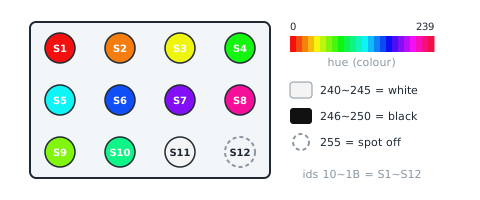
| Item | Detail |
|---|---|
| Meaning | 10 |
| Range | 0~255 |
| I2C / mBlock id | 10~1B |
| Locked | 🔒 LEGO mode layout will not change |
How to read it
SPIKE
mode 0 (edu) byte 0 🔒. Note: 同 EV3:Pybricks read(0) 得 8 個 int32,每個拆 3 byte(積木網站 MBC_HUE12 設定檔);玩具版不送;鎖住
from pybricks.iodevices import PUPDevice
from pybricks.parameters import Port

dev = PUPDevice(Port.A)   # sensor on port A

spotColor = dev.read(0)[0]   # spot 1~12 colour code
MBC library
from pybricks.parameters import Port
from MBC_hue12_Lib import HUE12Sensor

cam = HUE12Sensor(Port.A)
cam.update()   # refresh once per loop
spotColor = cam.get_slot(1)[1]   # list, channel 1 = [0]
EV3
mode 0 · int32×8 · HUE12 8×int32 LE(32 B):24 byte = [色相, 鮮豔度]×12,每 3 byte 塞一個 int32(byte3 = 0);格 n 色相 = byte 2(n−1) → int32 k = idx/3、byte = idx%3;鎖住 (locked mode: firmware and hosts will not change it)
from pybricks.iodevices import LUMPDevice
from pybricks.parameters import Port

sensor = LUMPDevice(Port.S1)   # sensor on port 1

spotColor = sensor.read(0)[0:12]   # spot 1~12 colour code
' clev3r (BASIC)
Sensor.SetMode(1, 0)
spotColor1 = Sensor.ReadRawValue(1, 0) ' first; for the N-th use 0 + N - 1Arduino I2C
Ids 0x10~0x1B are consecutive: one mbcReadMany call returns them from the same 10 ms snapshot.
int16_t spotColor[12];
mbcReadMany(0x4C, 0x10, 12, spotColor);   // spot 1~12 colour code:0~255
for (uint8_t i = 0; i < 12; i++) { Serial.print(spotColor[i]); Serial.print(' '); }
Serial.println();
mBlock
Block returns spot 112 colour code(0255)。Host sends [10] → reply [lo][hi][10 ^ lo ^ hi], value = int16 little-endian; channel N uses id 0x10 + (N − 1).
(SharpShot Vision WRO (legacy) port [1 v] spot [1 v] colour code :: sensing)
micro:bit
Returns 0 when the sensor does not answer; check with "device at … is ready" first.
(camera spot (1) colour code :: #00A4E4)
let spotColor = mbc.camSpotColor(1) // spot 1~12 colour code:0~255 (N = 1~12)Related block "camera spot [1~12] is [colour]"
let camSpotIs = mbc.camSpotIs(1, MbcCamSpotKind.Colour)20~2B spot 1~12 vividness spotVivid
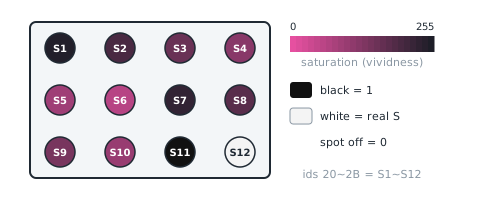
| Item | Detail |
|---|---|
| Meaning | 20 |
| Range | 0~255 |
| I2C / mBlock id | 20~2B |
| Locked | 🔒 LEGO mode layout will not change |
How to read it
SPIKE
mode 0 (edu) byte 1 🔒. Note: 同 EV3;鎖住
from pybricks.iodevices import PUPDevice
from pybricks.parameters import Port

dev = PUPDevice(Port.A)   # sensor on port A

spotVivid = dev.read(0)[1]   # spot 1~12 vividness
MBC library
from pybricks.parameters import Port
from MBC_hue12_Lib import HUE12Sensor

cam = HUE12Sensor(Port.A)
cam.update()   # refresh once per loop
spotVivid = cam.get_slot(1)[2]   # list, channel 1 = [0]
EV3
mode 0 · int32×8 · 同 10~1B:格 n 鮮豔度 = byte 2(n−1)+1;鎖住 (locked mode: firmware and hosts will not change it)
from pybricks.iodevices import LUMPDevice
from pybricks.parameters import Port

sensor = LUMPDevice(Port.S1)   # sensor on port 1

spotVivid = sensor.read(0)[0:12]   # spot 1~12 vividness
' clev3r (BASIC)
Sensor.SetMode(1, 0)
spotVivid1 = Sensor.ReadRawValue(1, 0) ' first; for the N-th use 0 + N - 1Arduino I2C
Ids 0x20~0x2B are consecutive: one mbcReadMany call returns them from the same 10 ms snapshot.
int16_t spotVivid[12];
mbcReadMany(0x4C, 0x20, 12, spotVivid);   // spot 1~12 vividness:0~255
for (uint8_t i = 0; i < 12; i++) { Serial.print(spotVivid[i]); Serial.print(' '); }
Serial.println();
mBlock
Block returns spot 112 vividness(0255)。Host sends [20] → reply [lo][hi][20 ^ lo ^ hi], value = int16 little-endian; channel N uses id 0x20 + (N − 1).
(SharpShot Vision WRO (legacy) port [1 v] spot [1 v] vividness :: sensing)
micro:bit
Returns 0 when the sensor does not answer; check with "device at … is ready" first.
(camera spot (1) vividness :: #00A4E4)
let spotVivid = mbc.camSpotVivid(1) // spot 1~12 vividness:0~255 (N = 1~12)Status flags F3
One status per bit of F3; read directly over I2C, mBlock, micro:bit.
| bit | Name | Meaning |
|---|---|---|
| b0 | ready (ready) |
always 1; b1 = 0 (the WRO edition has no 'blob found') |
SPIKE
SPIKE has no F3 flags; mode 8 returns ID / version. The official app cannot read mode 8.
from pybricks.iodevices import PUPDevice
from pybricks.parameters import Port

dev = PUPDevice(Port.A)   # sensor on port A

id_word, proto, fw, seq = dev.read(8)   # mode 8: [ID | hw0<<8, protocol 2, major×100+minor, counter]
addr = id_word & 0xFF   # 0x4C
hw0 = id_word >> 8      # 2
EV3
EV3 has no F3 flags; mode 5 returns the device ID and firmware version (ID format B).
from pybricks.iodevices import LUMPDevice
from pybricks.parameters import Port

sensor = LUMPDevice(Port.S1)   # sensor on port 1

id_word, fw = sensor.read(5)   # mode 5: [ID | hw0<<8, major×100+minor]
addr = id_word & 0xFF             # 0x4C
hw0 = id_word >> 8                # 2
Arduino I2C
int16_t st = mbcRead(0x4C, 0xF3);
bool ready = st & (1 << 0);   // ready
mBlock
The extension splits status flags F3 into boolean blocks (ready, calibrating, …).
micro:bit
let ready = mbc.deviceReady(0x4C)   // F3 bit0; false when nothing answers
let st = mbc.status(0x4C)   // F3
Shared registers and commands
Identical on every product, documented once in the universal I2C protocol:
| Id | Name | Meaning |
|---|---|---|
F0 |
device ID | low byte = factory I2C address (unchanged after re-addressing), high byte = hw[0] (channels / sensors / variant) |
F1 |
protocol version | 2 for this release (same number reported in SPIKE mode 8 v[1]) |
F2 |
firmware version | major×100 + minor (e.g. 102 = 1.2) |
F3 |
status flags | b0 = ready; other bits per product (see flags) |
F4 |
update counter | +1 every 10 ms snapshot, wraps 0~255 (2.56 s per cycle, not usable for reboot detection; frozen = module busy) |
F5 |
uptime seconds | seconds since boot, saturates at 32767 (~9 h); a drop means the module rebooted |
F8 |
change I2C address | [F8][new 0x08 |
EF |
reboot | [EF][0xA5]; mBlock sends ACK first, then reboots |
Sources and assumptions
Generated by _build/gen-reference.mjs from _build/protocol/cam_wro.json (single source of truth, transcribed from the 2026-10-21 protocol decisions).
- hw0 = 2(共識 #6:神攝手 2 = WRO 版);model = HUE12(樂高模式名)。
- I2C 0x4C 與學校版同一位址(主機用 F0 高 byte 1/2 分辨);D4:SDA = IO3、SCL = IO1,與 EV3/SPIKE 串口模式二選一編譯;ESP32 從機 onReceive 預載 32 B;上機待測。mBlock 用 Serial.begin(38400, SERIAL_8N1, 3, 1)。
- 值表只有 10
1B、202B(mBlock 定案);兩群各 12 個,I2C 一次連續讀 12 個值(24 B)剛好一群。 - EV3/SPIKE 只有一個模式 HUE12(type 95,動態描述表 DATA32×8),鎖住照盤點 §0-2 排法;沒有 ID 模式(type 95 只宣告 1 個模式,不加)。
- mVision 鎖住照盤點 §4:[0xAA][9][18 B][xor],byte 0
11 顏色碼、1217 鮮豔度 4 bit;WRO 隊伍的 HUE12_AS_mVisionSensor_v1.0.8.mbr4 在用,不動;B-6:不節流(每圈 loop 送)。 - mVision 的鮮豔度是 S>>4(0
15),值表 202B 是完整 0~255;兩者不同是既有設計,不改。 - 顏色碼 255 只代表「色點沒開」,不代表「沒找到」(沒抓到時仍回種子點顏色,盤點 §0-1)。
- 不做 0x22(hosts.matrix = false);沒有寫入命令;F3 只有 b0。