
Vision Sensor (School Edition) × mBlock 5 (Makeblock edition)
Back to Vision Sensor (School Edition)
The Makeblock edition of the Vision Sensor (School Edition) plugs into an RJ25 port on mBot, Ranger, Orion or MegaPi and is read with the MBC Pro Sensors extension v2 blocks. Installation and usable ports per board: Makeblock extension.
SPIKEEV3Arduino I2CmBlockMATRIXmicro:bit
Wiring
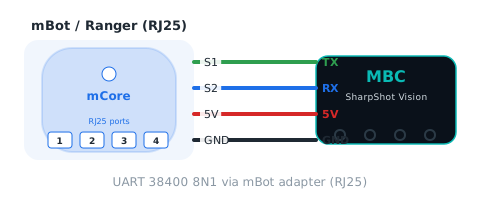
Sensor → mBot adapter → RJ25 port on the board (S1 = host TX, S2 = host RX). UART 38400 8N1.
Reporter blocks
| Block | Returns | Id | Meaning |
|---|---|---|---|
| SharpShot Vision (legacy) port [port] hue | -1~100 | 01 |
hue of sample point S1, 0 |
| SharpShot Vision (legacy) port [port] saturation | 0~100 | 02 |
saturation of sample point S1, 0~100 |
| SharpShot Vision (legacy) port [port] brightness | 0~100 | 03 |
brightness (HSV value) of sample point S1, 0~100 |
| SharpShot Vision (legacy) port [port] motion | 0~100 | 04 |
whole-frame motion 0~100 (more change = larger) |
| SharpShot Vision (legacy) port [port] blob X | 0~100 | 05 |
blob centre X 0~100, left = 0; 0 when not found |
| SharpShot Vision (legacy) port [port] blob Y | 0~75 | 06 |
blob centre Y 0~75, bottom = 0, top = 75; 0 when not found |
| SharpShot Vision (legacy) port [port] blob width | 0~100 | 07 |
blob width W 0~100; 0 = not found |
| SharpShot Vision (legacy) port [port] blob height | 0~75 | 08 |
blob height H 0~75; 0 when not found |
| SharpShot Vision (legacy) port [port] blob area | 0~7500 | 09 |
W×H (0~7500); 0 when not found |
| SharpShot Vision (legacy) port [port] blob found? | 0~1 | 0A |
1 = a blob of the target colour is in view (W > 0), 0 = none |
Command blocks
| Block | Id | Meaning |
|---|---|---|
| SharpShot Vision (legacy) port [port] update all values | FD |
reads the whole value table into a cache (FD pack-all); reporter blocks within the next 10 ms use the cache instead of asking one by one |
Status blocks
The extension exposes each F3 bit as a boolean block:
| bit | Name | Meaning |
|---|---|---|
| b0 | ready (ready) |
always 1 (values freeze while the camera menu is open) |
| b1 | blob found (found) |
same as value 0A |
Packet format (for your own decoder)
| Action | Format |
|---|---|
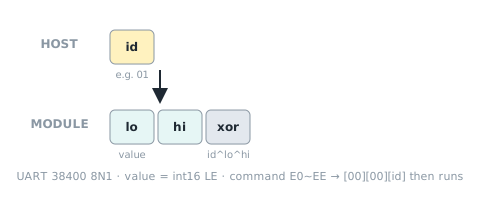
| Read one value | 主機送 [編號] → 回 [值低][值高][編號^值低^值高] |
| Write command | 寫入命令 E0~EE:收齊參數後回 [00][00][編號] 再執行;20 ms 內沒收齊就丟棄 |
| Unknown id | [00][80][編號^0x80](= -32768) |
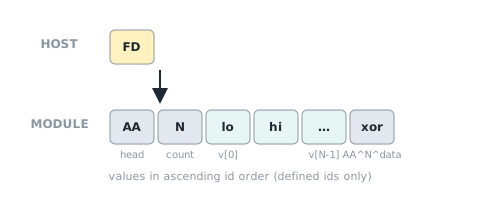
| Pack all (FD) | Send [FD] → reply [AA][0A][10 × int16 LE][xor], xor = AA ^ N ^ all data bytes; content = this value table in ascending id order (shared ids and commands excluded). The extension fetches it once and serves blocks from a 10 ms cache. |
| Shared ids | F0 device ID, F1 protocol version, F2 firmware version, F3 status flags |
Sources and assumptions
Generated by _build/gen-reference.mjs from _build/protocol/cam_school.json (single source of truth, transcribed from the 2026-10-21 protocol decisions).
- hw0 = 1(共識 #6:神攝手 1 = 學校版);model 字串 CAMSCH 照任務指定(韌體原本沒有型號欄位)。
- D4:I2C 0x4C 用 SDA = IO3、SCL = IO1(沿 PS4 Wire.setPins 慣例),與 EV3/SPIKE 串口模式二選一編譯;ESP32 從機不能時脈延展,onReceive 預載 32 B;頁面標「硬體已確認,上機待測」。mBlock 用同一組腳 Serial.begin(38400, SERIAL_8N1, 3, 1)。
- EV3 六個模式全部鎖住照盤點(模式 3/5 的 −1 已在 #65 修成符號延伸);EV3 定案最後的 golden 備註把 cam_school 列進「模式 5 改 ID」是筆誤(定案表本身寫「—」;模式 5 仍是 [色相, 飽和]),所以 ev3IdMode = null。
- SPIKE 模式 9 鎖住,只有 byte 8
9(v[4])從 0 改成面積 W×H;模式 6 改 [X, Y, 面積];模式 8 = [0x4C | 1<<8, 2, 韌體版, 更新序號];模式 14 維持 0。 - SPIKE 模式 0 的「面積」是 map(像素面積 0
5000 → 0100),跟值表 09 的 W×H 不同,鎖住不改(照盤點)。 - mVision:N = 10(idx 0~9),色相 −1 送 255;每 20 ms 一包(B-6);不做 0x22(hosts.matrix = false)。
- 0A 有找到色塊 = W > 0(盤點:W 0 = 沒找到);F3 b1 同這個值。
- 值 05~08 的「沒找到 = 0」照盤點 §0;色塊 Y 下 = 0、上 = 75 照盤點(map(bestY,120,0,0,75))。
- 沒有寫入命令(韌體無法從程式改目標顏色/補光燈)。
- Block wording follows the v2.0.0 extension generator
build_mext.js; this page is generated from the same JSON.