
IMU Gyro Sensor: value & command reference
Every value and command the IMU Gyro Sensor reports to each host: what it means, its range, and how to read it on SPIKE / EV3 / Arduino I2C / mBlock / MATRIX / micro:bit. Append ?host=spike (or ev3, arduino, mblock, matrix, microbit) to the URL to expand that host by default.
SPIKEEV3Arduino I2CmBlockMATRIXmicro:bit
| Item | Detail |
|---|---|
| Factory I2C address | 0x6A |
| hw[0] | 1(F0 high byte; ID high byte in SPIKE mode 8 / EV3 mode 5) |
| Model | IMU |
| Protocol version | 2 |
| Hosts | EV3, Arduino I2C, mBlock, MATRIX, micro:bit |
Values at a glance
| Id | Value | Range | EV3 | Arduino I2C | mBlock | MATRIX | micro:bit |
|---|---|---|---|---|---|---|---|
01 |
gyro 3D heading | -32768~32767 ° | ✓ | ✓ | ✓ | ✓ | ✓ |
02 |
fused heading | -32768~32767 ° | ✓ | ✓ | ✓ | ✓ | ✓ |
03 |
gyro 1D heading | -32768~32767 ° | ✓ | ✓ | ✓ | ✓ | ✓ |
04 |
magnetic heading | -32768~32767 ° | ✓ | ✓ | ✓ | — | ✓ |
05 |
yaw rate | -32768~32767 0.1 dps | ✓ | ✓ | ✓ | — | ✓ |
06 |
pitch angle | -90~+90 ° | ✓ | ✓ | ✓ | — | ✓ |
07 |
pitch rate | -32768~32767 0.1 dps | ✓ | ✓ | ✓ | — | ✓ |
08 |
magnetometer trust | 0~255 | — | ✓ | ✓ | — | ✓ |
09 |
magnetic disturbance | 0~255 0.01° | — | ✓ | ✓ | — | ✓ |
0A |
face up | 0~5 | — | ✓ | ✓ | — | ✓ |
10~12 |
gyro axis 1~3 | -32768~32767 0.1 dps | — | ✓ | ✓ | — | ✓ |
13~15 |
accel axis 1~3 | -32768~32767 mg | — | ✓ | ✓ | — | ✓ |
16~18 |
mag axis 1~3 | -32768~32767 mG | — | ✓ | ✓ | — | ✓ |
0B |
command status | 0~0xEF03 | — | ✓ | — | — | — |
✓ = available on that host; — = not sent.
Reading each value
01 gyro 3D heading headingGyro3D
| Item | Detail |
|---|---|
| Meaning | heading from the 3D quaternion, degrees, 0 at boot/zero, accumulates past 360 (wraps at ±32767, ~91 turns) |
| Range | -32768~32767 ° |
| I2C / mBlock id | 01 |
| Locked | 🔒 LEGO mode layout will not change |
How to read it
EV3
mode 0 · int16 · GYRO-ANG 1×int16(盤點:mode0 = 陀螺 3D,INO:232-234) (locked mode: firmware and hosts will not change it)
from pybricks.iodevices import LUMPDevice
from pybricks.parameters import Port

sensor = LUMPDevice(Port.S1)   # sensor on port 1

headingGyro3D = sensor.read(0)[0]   # gyro 3D heading:-32768~32767 °
' clev3r (BASIC)
Sensor.SetMode(1, 0)
headingGyro3D = Sensor.ReadRawValue(1, 0)Arduino I2C
This value can itself be −32768 (top bit set, e.g. 0x8000), the same as MBC_NONE for no answer, so do not test for −32768: use mbcReadMany(0x6A, 0x01, 1, &headingGyro3D) instead; only a false return means no answer.
int16_t headingGyro3D = mbcRead(0x6A, 0x01); // gyro 3D heading:-32768~32767 °mBlock
Block returns gyro 3D heading(-32768~32767 °)。Host sends [01] → reply [lo][hi][01 ^ lo ^ hi], value = int16 little-endian.
(IMU Gyro port [1 v] gyro 3D heading :: sensing)
MATRIX
0x22 R~G (+32768).
// A. stock 0x22 blocks:R~G = gyro 3D heading(R = (航向+32768) 低 byte、G = 高 byte(R4 版:低在前);主機 hi×256+lo−32768)
int raw = MiniR4.I2C1.MXColor.getColor(R);   // group 1
micro:bit
Returns 0 when the sensor does not answer; check with "device at … is ready" first.
(IMU heading [gyro 3D v] \(°\) :: #00A4E4)
let headingGyro3D = mbc.imuHeading(MbcImuHeading.Gyro3D) // gyro 3D heading:-32768~32767 °02 fused heading headingFused
| Item | Detail |
|---|---|
| Meaning | 3D gyro heading slowly corrected by the magnetometer, degrees, relative to the zero point; may exceed 360 |
| Range | -32768~32767 ° |
| I2C / mBlock id | 02 |
| Locked | 🔒 LEGO mode layout will not change |
How to read it
EV3
mode 1 · int16 · GYRO-RATE 1×int16 = 融合航向(EV3 定案:不改) (locked mode: firmware and hosts will not change it)
from pybricks.iodevices import LUMPDevice
from pybricks.parameters import Port

sensor = LUMPDevice(Port.S1)   # sensor on port 1

headingFused = sensor.read(1)[0]   # fused heading:-32768~32767 °
' clev3r (BASIC)
Sensor.SetMode(1, 1)
headingFused = Sensor.ReadRawValue(1, 0)Arduino I2C
This value can itself be −32768 (top bit set, e.g. 0x8000), the same as MBC_NONE for no answer, so do not test for −32768: use mbcReadMany(0x6A, 0x02, 1, &headingFused) instead; only a false return means no answer.
int16_t headingFused = mbcRead(0x6A, 0x02); // fused heading:-32768~32767 °mBlock
Block returns fused heading(-32768~32767 °)。Host sends [02] → reply [lo][hi][02 ^ lo ^ hi], value = int16 little-endian.
(IMU Gyro port [1 v] fused heading :: sensing)
MATRIX
0x22 B~C (+32768).
// A. stock 0x22 blocks:B~C = fused heading(B = 低 byte、C = 高 byte)
int raw = MiniR4.I2C1.MXColor.getColor(B);   // group 1
micro:bit
Returns 0 when the sensor does not answer; check with "device at … is ready" first.
(IMU heading [fused v] \(°\) :: #00A4E4)
let headingFused = mbc.imuHeading(MbcImuHeading.Fused) // fused heading:-32768~32767 °Related block "on IMU turned by 90 °"
mbc.onImuTurned(90, function () {
})
03 gyro 1D heading headingGyro1D
| Item | Detail |
|---|---|
| Meaning | heading integrated about the yaw axis only, degrees, 0 at boot/zero; may exceed 360 |
| Range | -32768~32767 ° |
| I2C / mBlock id | 03 |
| Locked | 🔒 LEGO mode layout will not change |
How to read it
EV3
mode 3 · int16 · GYRO-G&A 2×int16 [陀螺 1D, 磁力航向] (locked mode: firmware and hosts will not change it)
from pybricks.iodevices import LUMPDevice
from pybricks.parameters import Port

sensor = LUMPDevice(Port.S1)   # sensor on port 1

headingGyro1D = sensor.read(3)[0]   # gyro 1D heading:-32768~32767 °
' clev3r (BASIC)
Sensor.SetMode(1, 3)
headingGyro1D = Sensor.ReadRawValue(1, 0)Arduino I2C
This value can itself be −32768 (top bit set, e.g. 0x8000), the same as MBC_NONE for no answer, so do not test for −32768: use mbcReadMany(0x6A, 0x03, 1, &headingGyro1D) instead; only a false return means no answer.
int16_t headingGyro1D = mbcRead(0x6A, 0x03); // gyro 1D heading:-32768~32767 °mBlock
Block returns gyro 1D heading(-32768~32767 °)。Host sends [03] → reply [lo][hi][03 ^ lo ^ hi], value = int16 little-endian.
(IMU Gyro port [1 v] gyro 1D heading :: sensing)
MATRIX
0x22 M~Y (+32768).
// A. stock 0x22 blocks:M~Y = gyro 1D heading(M = 低 byte、Y = 高 byte;K(10)= 0)
int raw = MiniR4.I2C1.MXColor.getColor(M);   // group 1
micro:bit
Returns 0 when the sensor does not answer; check with "device at … is ready" first.
(IMU heading [gyro 1D v] \(°\) :: #00A4E4)
let headingGyro1D = mbc.imuHeading(MbcImuHeading.Gyro1D) // gyro 1D heading:-32768~32767 °04 magnetic heading headingMag
| Item | Detail |
|---|---|
| Meaning | tilt-compensated magnetometer heading, degrees, relative to the zero point |
| Range | -32768~32767 ° |
| I2C / mBlock id | 04 |
| Locked | 🔒 LEGO mode layout will not change |
How to read it
EV3
mode 3 · int16 (locked mode: firmware and hosts will not change it)
from pybricks.iodevices import LUMPDevice
from pybricks.parameters import Port

sensor = LUMPDevice(Port.S1)   # sensor on port 1

headingMag = sensor.read(3)[1]   # magnetic heading:-32768~32767 °
' clev3r (BASIC)
Sensor.SetMode(1, 3)
headingMag = Sensor.ReadRawValue(1, 1)Arduino I2C
This value can itself be −32768 (top bit set, e.g. 0x8000), the same as MBC_NONE for no answer, so do not test for −32768: use mbcReadMany(0x6A, 0x04, 1, &headingMag) instead; only a false return means no answer.
int16_t headingMag = mbcRead(0x6A, 0x04); // magnetic heading:-32768~32767 °mBlock
Block returns magnetic heading(-32768~32767 °)。Host sends [04] → reply [lo][hi][04 ^ lo ^ hi], value = int16 little-endian.
(IMU Gyro port [1 v] magnetic heading :: sensing)
MATRIX
Not available with the stock MATRIX 0x22 blocks.
micro:bit
Returns 0 when the sensor does not answer; check with "device at … is ready" first.
(IMU heading [magnetic v] \(°\) :: #00A4E4)
let headingMag = mbc.imuHeading(MbcImuHeading.Magnetic) // magnetic heading:-32768~32767 °05 yaw rate yawRate
| Item | Detail |
|---|---|
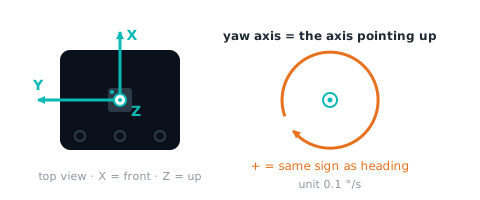
| Meaning | angular rate about the yaw axis (getYawAxis()), 0.1 deg/s, same sign as the heading |
| Range | -32768~32767 0.1 dps |
| I2C / mBlock id | 05 |
How to read it
EV3
mode 2 · int16 · GYRO-FAS 1×int16(#67 新增,原本 0)
from pybricks.iodevices import LUMPDevice
from pybricks.parameters import Port

sensor = LUMPDevice(Port.S1)   # sensor on port 1

yawRate = sensor.read(2)[0]   # yaw rate:-32768~32767 0.1 dps
' clev3r (BASIC)
Sensor.SetMode(1, 2)
yawRate = Sensor.ReadRawValue(1, 0)Arduino I2C
This value can itself be −32768 (top bit set, e.g. 0x8000), the same as MBC_NONE for no answer, so do not test for −32768: use mbcReadMany(0x6A, 0x05, 1, &yawRate) instead; only a false return means no answer.
int16_t yawRate = mbcRead(0x6A, 0x05); // yaw rate:-32768~32767 0.1 dpsmBlock
Block returns yaw rate(-32768~32767 0.1 dps)。Host sends [05] → reply [lo][hi][05 ^ lo ^ hi], value = int16 little-endian.
(IMU Gyro port [1 v] yaw rate :: sensing)
MATRIX
Not available with the stock MATRIX 0x22 blocks.
micro:bit
Returns 0 when the sensor does not answer; check with "device at … is ready" first.
(IMU turn rate \(0.1 °/s\) :: #00A4E4)
let yawRate = mbc.imuYawRate() // yaw rate:-32768~32767 0.1 dpsRelated block "IMU is [still]"
let imuFlag = mbc.imuFlag(MbcImuFlag.Still)06 pitch angle pitch
| Item | Detail |
|---|---|
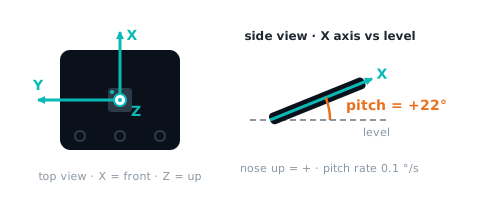
| Meaning | elevation of the board's printed X axis above horizontal: +90 pointing up, −90 pointing down, 0 level (from the gravity vector) |
| Range | -90~+90 ° |
| I2C / mBlock id | 06 |
How to read it
EV3
mode 6 · int16 · TILT-ANG 1×int16(#67 新增,原本 0)
from pybricks.iodevices import LUMPDevice
from pybricks.parameters import Port

sensor = LUMPDevice(Port.S1)   # sensor on port 1

pitch = sensor.read(6)[0]   # pitch angle:-90~+90 °
' clev3r (BASIC)
Sensor.SetMode(1, 6)
pitch = Sensor.ReadRawValue(1, 0)Arduino I2C
Returns MBC_NONE (−32768) when the module does not answer.
int16_t pitch = mbcRead(0x6A, 0x06); // pitch angle:-90~+90 °mBlock
Block returns pitch angle(-90~+90 °)。Host sends [06] → reply [lo][hi][06 ^ lo ^ hi], value = int16 little-endian.
(IMU Gyro port [1 v] pitch angle :: sensing)
MATRIX
Not available with the stock MATRIX 0x22 blocks.
micro:bit
Returns 0 when the sensor does not answer; check with "device at … is ready" first.
(IMU pitch \(°\) :: #00A4E4)
let pitch = mbc.imuPitch() // pitch angle:-90~+90 °07 pitch rate pitchRate
| Item | Detail |
|---|---|
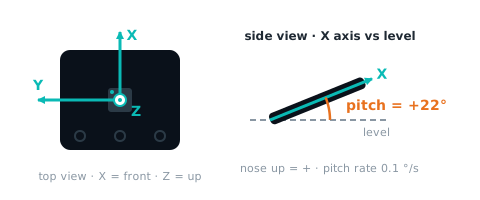
| Meaning | angular rate about the board's printed X axis, 0.1 °/s (right-hand rule, CCW seen from +X is positive); this is gyro X, not the derivative of 06 |
| Range | -32768~32767 0.1 dps |
| I2C / mBlock id | 07 |
How to read it
EV3
mode 5 · int16 · TILT-RATE 1×int16(#67:取代 #65 統一時放的 ID,ID 移到模式 4)
from pybricks.iodevices import LUMPDevice
from pybricks.parameters import Port

sensor = LUMPDevice(Port.S1)   # sensor on port 1

pitchRate = sensor.read(5)[0]   # pitch rate:-32768~32767 0.1 dps
' clev3r (BASIC)
Sensor.SetMode(1, 5)
pitchRate = Sensor.ReadRawValue(1, 0)Arduino I2C
This value can itself be −32768 (top bit set, e.g. 0x8000), the same as MBC_NONE for no answer, so do not test for −32768: use mbcReadMany(0x6A, 0x07, 1, &pitchRate) instead; only a false return means no answer.
int16_t pitchRate = mbcRead(0x6A, 0x07); // pitch rate:-32768~32767 0.1 dpsmBlock
Block returns pitch rate(-32768~32767 0.1 dps)。Host sends [07] → reply [lo][hi][07 ^ lo ^ hi], value = int16 little-endian.
(IMU Gyro port [1 v] pitch rate :: sensing)
MATRIX
Not available with the stock MATRIX 0x22 blocks.
micro:bit
Returns 0 when the sensor does not answer; check with "device at … is ready" first.
(IMU pitch rate \(0.1 °/s\) :: #00A4E4)
let pitchRate = mbc.imuPitchRate() // pitch rate:-32768~32767 0.1 dps08 magnetometer trust magTrust
| Item | Detail |
|---|---|
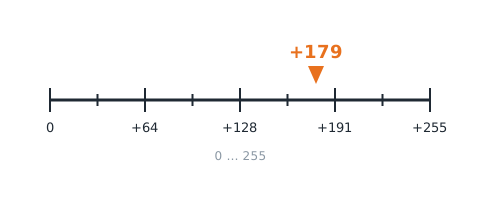
| Meaning | how much the fusion trusts the magnetometer, 0 |
| Range | 0~255 |
| I2C / mBlock id | 08 |
How to read it
EV3
Not sent in any EV3 mode (the locked EV3 modes stay as they are). Use Arduino I2C / mBlock if you need it.
Arduino I2C
Returns MBC_NONE (−32768) when the module does not answer.
int16_t magTrust = mbcRead(0x6A, 0x08); // magnetometer trust:0~255mBlock
Block returns magnetometer trust(0~255)。Host sends [08] → reply [lo][hi][08 ^ lo ^ hi], value = int16 little-endian.
(IMU Gyro port [1 v] magnetometer trust :: sensing)
MATRIX
Not available with the stock MATRIX 0x22 blocks.
micro:bit
Returns 0 when the sensor does not answer; check with "device at … is ready" first.
(IMU magnetic trust :: #00A4E4)
let magTrust = mbc.imuMagTrust() // magnetometer trust:0~25509 magnetic disturbance magDisturb
| Item | Detail |
|---|---|
| Meaning | magnetic disturbance level 0~255 (degrees × 100, capped at 255) |
| Range | 0~255 0.01° |
| I2C / mBlock id | 09 |
How to read it
EV3
Not sent in any EV3 mode (the locked EV3 modes stay as they are). Use Arduino I2C / mBlock if you need it.
Arduino I2C
Returns MBC_NONE (−32768) when the module does not answer.
int16_t magDisturb = mbcRead(0x6A, 0x09); // magnetic disturbance:0~255 0.01°mBlock
Block returns magnetic disturbance(0~255 0.01°)。Host sends [09] → reply [lo][hi][09 ^ lo ^ hi], value = int16 little-endian.
(IMU Gyro port [1 v] magnetic disturbance :: sensing)
MATRIX
Not available with the stock MATRIX 0x22 blocks.
micro:bit
Returns 0 when the sensor does not answer; check with "device at … is ready" first.
(IMU magnetic disturbance :: #00A4E4)
let magDisturb = mbc.imuMagDisturbance() // magnetic disturbance:0~255 0.01°0A face up upFace
| Item | Detail |
|---|---|
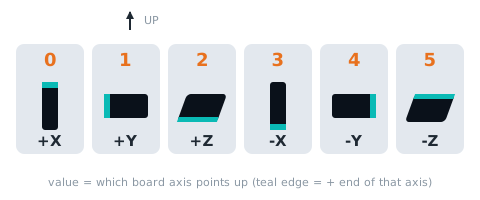
| Meaning | which axis points up: 0 +X, 1 +Y, 2 +Z, 3 −X, 4 −Y, 5 −Z (physical axes) |
| Range | 0~5 |
| I2C / mBlock id | 0A |
How to read it
EV3
Not sent in any EV3 mode (the locked EV3 modes stay as they are). Use Arduino I2C / mBlock if you need it.
Arduino I2C
Returns MBC_NONE (−32768) when the module does not answer.
int16_t upFace = mbcRead(0x6A, 0x0A); // face up:0~5mBlock
Block returns face up(0~5)。Host sends [0A] → reply [lo][hi][0A ^ lo ^ hi], value = int16 little-endian.
(IMU Gyro port [1 v] face up :: sensing)
MATRIX
Not available with the stock MATRIX 0x22 blocks.
micro:bit
Returns 0 when the sensor does not answer; check with "device at … is ready" first.
(IMU face up :: #00A4E4)
let upFace = mbc.imuFaceUp() // face up:0~5Related block "IMU face up is [+Z]"
let imuFaceUpIs = mbc.imuFaceUpIs(MbcImuFace.PlusZ)10~12 gyro axis 1~3 gyro
| Item | Detail |
|---|---|
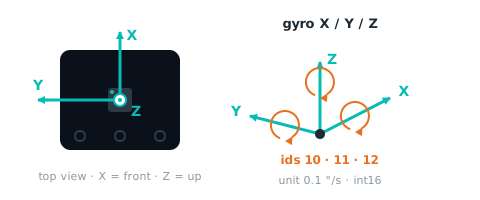
| Meaning | 10 X, 11 Y, 12 Z angular rate, 0.1 deg/s (physical axes, sign-corrected) |
| Range | -32768~32767 0.1 dps |
| I2C / mBlock id | 10~12 |
How to read it
EV3
Not sent in any EV3 mode (the locked EV3 modes stay as they are). Use Arduino I2C / mBlock if you need it.
Arduino I2C
Ids 0x10~0x12 are consecutive: one mbcReadMany call returns them from the same 10 ms snapshot.
int16_t gyro[3];
mbcReadMany(0x6A, 0x10, 3, gyro);   // gyro axis 1~3:-32768~32767 0.1 dps
for (uint8_t i = 0; i < 3; i++) { Serial.print(gyro[i]); Serial.print(' '); }
Serial.println();
mBlock
Block returns gyro axis 13(-3276832767 0.1 dps)。Host sends [10] → reply [lo][hi][10 ^ lo ^ hi], value = int16 little-endian; channel N uses id 0x10 + (N − 1).
(IMU Gyro port [1 v] gyro [axis] :: sensing)
MATRIX
Not available with the stock MATRIX 0x22 blocks.
micro:bit
Returns 0 when the sensor does not answer; check with "device at … is ready" first.
(IMU [gyro \(0.1 °/s\) v] axis [X v] :: #00A4E4)
let gyro = [mbc.imuAxis(MbcImuSensor.Gyro, MbcAxis.X), mbc.imuAxis(MbcImuSensor.Gyro, MbcAxis.Y), mbc.imuAxis(MbcImuSensor.Gyro, MbcAxis.Z)] // gyro axis 1~3:-32768~32767 0.1 dps13~15 accel axis 1~3 accel
| Item | Detail |
|---|---|
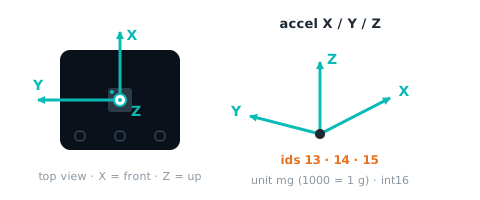
| Meaning | 13 X, 14 Y, 15 Z acceleration, mg (1000 = 1 g) |
| Range | -32768~32767 mg |
| I2C / mBlock id | 13~15 |
How to read it
EV3
Not sent in any EV3 mode (the locked EV3 modes stay as they are). Use Arduino I2C / mBlock if you need it.
Arduino I2C
Ids 0x13~0x15 are consecutive: one mbcReadMany call returns them from the same 10 ms snapshot.
int16_t accel[3];
mbcReadMany(0x6A, 0x13, 3, accel);   // accel axis 1~3:-32768~32767 mg
for (uint8_t i = 0; i < 3; i++) { Serial.print(accel[i]); Serial.print(' '); }
Serial.println();
mBlock
Block returns accel axis 13(-3276832767 mg)。Host sends [13] → reply [lo][hi][13 ^ lo ^ hi], value = int16 little-endian; channel N uses id 0x13 + (N − 1).
(IMU Gyro port [1 v] accel [axis] :: sensing)
MATRIX
Not available with the stock MATRIX 0x22 blocks.
micro:bit
Returns 0 when the sensor does not answer; check with "device at … is ready" first.
(IMU [accelerometer \(mg\) v] axis [X v] :: #00A4E4)
let accel = [mbc.imuAxis(MbcImuSensor.Accel, MbcAxis.X), mbc.imuAxis(MbcImuSensor.Accel, MbcAxis.Y), mbc.imuAxis(MbcImuSensor.Accel, MbcAxis.Z)] // accel axis 1~3:-32768~32767 mg16~18 mag axis 1~3 mag
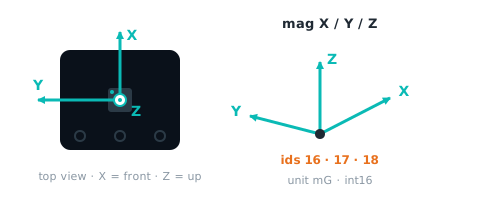
| Item | Detail |
|---|---|
| Meaning | 16 X, 17 Y, 18 Z magnetic field, mG (milligauss) |
| Range | -32768~32767 mG |
| I2C / mBlock id | 16~18 |
How to read it
EV3
Not sent in any EV3 mode (the locked EV3 modes stay as they are). Use Arduino I2C / mBlock if you need it.
Arduino I2C
Ids 0x16~0x18 are consecutive: one mbcReadMany call returns them from the same 10 ms snapshot.
int16_t mag[3];
mbcReadMany(0x6A, 0x16, 3, mag);   // mag axis 1~3:-32768~32767 mG
for (uint8_t i = 0; i < 3; i++) { Serial.print(mag[i]); Serial.print(' '); }
Serial.println();
mBlock
Block returns mag axis 13(-3276832767 mG)。Host sends [16] → reply [lo][hi][16 ^ lo ^ hi], value = int16 little-endian; channel N uses id 0x16 + (N − 1).
(IMU Gyro port [1 v] mag [axis] :: sensing)
MATRIX
Not available with the stock MATRIX 0x22 blocks.
micro:bit
Returns 0 when the sensor does not answer; check with "device at … is ready" first.
(IMU [magnetometer \(mG\) v] axis [X v] :: #00A4E4)
let mag = [mbc.imuAxis(MbcImuSensor.Mag, MbcAxis.X), mbc.imuAxis(MbcImuSensor.Mag, MbcAxis.Y), mbc.imuAxis(MbcImuSensor.Mag, MbcAxis.Z)] // mag axis 1~3:-32768~32767 mG0B command status cmdStatus
| Item | Detail |
|---|---|
| Meaning | (last command code << 8) | state; state 0 done, 1 busy, 2 failed, 3 rejected (same codes as the SPIKE command reply (mode 8 v3)); reported for E1~EB; undefined codes after EB: ignored on I2C, 0B unchanged (SPIKE replies 3 rejected) |
| Range | 0~0xEF03 |
| I2C / mBlock id | 0B |
How to read it
EV3
Not sent in any EV3 mode (the locked EV3 modes stay as they are). Use Arduino I2C / mBlock if you need it.
Arduino I2C
Returns MBC_NONE (−32768) when the module does not answer.
int16_t cmdStatus = mbcRead(0x6A, 0x0B); // command status:0~0xEF03MATRIX
Not available with the stock MATRIX 0x22 blocks.
micro:bit
No dedicated block; in JavaScript read it with mbc.readValue(address, id) (−32768 when nothing answers).
let cmdStatus = mbc.readValue(0x6A, 0x0B) // command status:0~0xEF03Write commands
Only Arduino I2C, mBlock and micro:bit can send commands; the SPIKE / EV3 ports are read-only.
E0 zero heading zeroHeading
| Item | Detail |
|---|---|
| Action | zero all four headings (zeroHeadings()); EV3 also accepts the stock gyro-reset WRITE 0x11 |
| Parameters | none |
| Busy flag | none (immediate) |
How to send it
EV3
The EV3 port carries no write commands: calibrate with the button on the sensor, change settings over Arduino I2C / mBlock.
Arduino I2C
mbcWrite(0x6A, 0xE0); // zero headingmBlock
Host sends [E0] → reply [00][00][E0] (ack), then it runs.
IMU Gyro port [1 v] zero heading :: sensing
MATRIX
Not available with the stock MATRIX 0x22 blocks.
micro:bit
IMU zero heading :: #00A4E4
mbc.imuZeroHeading() // zero headingE1 start accelerometer calibration accelCalStart
| Item | Detail |
|---|---|
| Action | start accelerometer calibration (= v1 0x20=0x01); F3 b4 = 1 meanwhile; ignored during magnetometer calibration (0B state 3 rejected) |
| Parameters | none |
| Busy flag | F3 bit4(1 while running) |
How to send it
EV3
The EV3 port carries no write commands: calibrate with the button on the sensor, change settings over Arduino I2C / mBlock.
Arduino I2C
mbcWrite(0x6A, 0xE1);   // start accelerometer calibration
// F3 bit4 = 1 while calibrating. Do the moves in the product guide, then send "end accelerometer calibration": mbcWrite(0x6A, 0xE2); only then bit4 clears
mBlock
Host sends [E1] → reply [00][00][E1] (ack), then it runs; F3 bit4 = 1 while busy.
IMU Gyro port [1 v] start accelerometer calibration :: sensing
MATRIX
Not available with the stock MATRIX 0x22 blocks.
micro:bit
IMU calibration [accelerometer start v] :: #00A4E4
mbc.imuCalibrate(MbcImuCalib.AccelStart) // start accelerometer calibrationE2 end accelerometer calibration accelCalEnd
| Item | Detail |
|---|---|
| Action | finish accelerometer calibration and save to EEPROM (= v1 0x20=0x02); on success the mount axis is re-captured and headings are zeroed once the sensor is level and still (not immediately); rejected if not calibrating (0B state 3); failed check → 0B state 2 |
| Parameters | none |
| Busy flag | none (immediate) |
How to send it
EV3
The EV3 port carries no write commands: calibrate with the button on the sensor, change settings over Arduino I2C / mBlock.
Arduino I2C
mbcWrite(0x6A, 0xE2); // end accelerometer calibrationmBlock
Host sends [E2] → reply [00][00][E2] (ack), then it runs.
IMU Gyro port [1 v] end accelerometer calibration :: sensing
MATRIX
Not available with the stock MATRIX 0x22 blocks.
micro:bit
IMU calibration [accelerometer end v] :: #00A4E4
mbc.imuCalibrate(MbcImuCalib.AccelEnd) // end accelerometer calibrationE3 start magnetometer calibration magCalStart
| Item | Detail |
|---|---|
| Action | start magnetometer calibration (= v1 0x20=0x03); F3 b5 = 1 meanwhile; ignored if the magnetometer has failed (0B state 3) |
| Parameters | none |
| Busy flag | F3 bit5(1 while running) |
How to send it
EV3
The EV3 port carries no write commands: calibrate with the button on the sensor, change settings over Arduino I2C / mBlock.
Arduino I2C
mbcWrite(0x6A, 0xE3);   // start magnetometer calibration
// F3 bit5 = 1 while calibrating. Do the moves in the product guide, then send "end magnetometer calibration": mbcWrite(0x6A, 0xE4); only then bit5 clears
mBlock
Host sends [E3] → reply [00][00][E3] (ack), then it runs; F3 bit5 = 1 while busy.
IMU Gyro port [1 v] start magnetometer calibration :: sensing
MATRIX
Not available with the stock MATRIX 0x22 blocks.
micro:bit
IMU calibration [magnetometer start v] :: #00A4E4
mbc.imuCalibrate(MbcImuCalib.MagStart) // start magnetometer calibrationE4 end magnetometer calibration magCalEnd
| Item | Detail |
|---|---|
| Action | finish magnetometer calibration and save to EEPROM (= v1 0x20=0x04); headings zeroed right away on success; rejected if not calibrating (0B state 3); failed check → 0B state 2 |
| Parameters | none |
| Busy flag | none (immediate) |
How to send it
EV3
The EV3 port carries no write commands: calibrate with the button on the sensor, change settings over Arduino I2C / mBlock.
Arduino I2C
mbcWrite(0x6A, 0xE4); // end magnetometer calibrationmBlock
Host sends [E4] → reply [00][00][E4] (ack), then it runs.
IMU Gyro port [1 v] end magnetometer calibration :: sensing
MATRIX
Not available with the stock MATRIX 0x22 blocks.
micro:bit
IMU calibration [magnetometer end v] :: #00A4E4
mbc.imuCalibrate(MbcImuCalib.MagEnd) // end magnetometer calibrationE5 set heading setHeading
| Item | Detail |
|---|---|
| Action | [angle int16 little-endian]: all four headings set to this angle (RAM); rejected while calibrating (0B state 3) |
| Parameters | angle int16 °(2 byte) |
| Busy flag | none (immediate) |
How to send it
EV3
The EV3 port carries no write commands: calibrate with the button on the sensor, change settings over Arduino I2C / mBlock.
Arduino I2C
mbcWrite(0x6A, 0xE5, 32); // set heading(angle int16 °)MATRIX
Not available with the stock MATRIX 0x22 blocks.
micro:bit
No dedicated block; in JavaScript use mbc.writeCmd(0x6A, 0xE5, [params]).
E6 north as zero zeroNorth
| Item | Detail |
|---|---|
| Action | gyro heading set to the current magnetic bearing 0~359, then only whole turns are removed (absolute bearing); fusion re-init within ~3 s, timeout = failed; rejected while calibrating (0B state 3) |
| Parameters | none |
| Busy flag | none (immediate) |
How to send it
EV3
The EV3 port carries no write commands: calibrate with the button on the sensor, change settings over Arduino I2C / mBlock.
Arduino I2C
mbcWrite(0x6A, 0xE6); // north as zeroMATRIX
Not available with the stock MATRIX 0x22 blocks.
micro:bit
No dedicated block; in JavaScript use mbc.writeCmd(0x6A, 0xE6, [params]).
E7 re-estimate gyro bias gyroBiasReset
| Item | Detail |
|---|---|
| Action | re-estimates the gyro bias over ~1.5 s of stillness (3 still windows); moved and not done within 4 s = failed; rejected while calibrating (0B state 3) |
| Parameters | none |
| Busy flag | none (immediate) |
How to send it
EV3
The EV3 port carries no write commands: calibrate with the button on the sensor, change settings over Arduino I2C / mBlock.
Arduino I2C
mbcWrite(0x6A, 0xE7); // re-estimate gyro biasMATRIX
Not available with the stock MATRIX 0x22 blocks.
micro:bit
No dedicated block; in JavaScript use mbc.writeCmd(0x6A, 0xE7, [params]).
E8 re-capture mount axis recaptureAxis
| Item | Detail |
|---|---|
| Action | re-detects the mounting orientation (headings zeroed after capture); RAM; rejected while calibrating (0B state 3) |
| Parameters | none |
| Busy flag | none (immediate) |
How to send it
EV3
The EV3 port carries no write commands: calibrate with the button on the sensor, change settings over Arduino I2C / mBlock.
Arduino I2C
mbcWrite(0x6A, 0xE8); // re-capture mount axisMATRIX
Not available with the stock MATRIX 0x22 blocks.
micro:bit
No dedicated block; in JavaScript use mbc.writeCmd(0x6A, 0xE8, [params]).
E9 cancel calibration cancelCalib
| Item | Detail |
|---|---|
| Action | cancels the running accelerometer / magnetometer calibration without saving (old values restored) |
| Parameters | none |
| Busy flag | none (immediate) |
How to send it
EV3
The EV3 port carries no write commands: calibrate with the button on the sensor, change settings over Arduino I2C / mBlock.
Arduino I2C
mbcWrite(0x6A, 0xE9); // cancel calibrationMATRIX
Not available with the stock MATRIX 0x22 blocks.
micro:bit
No dedicated block; in JavaScript use mbc.writeCmd(0x6A, 0xE9, [params]).
EA heading correction headingCorrection
| Item | Detail |
|---|---|
| Action | [uint16 little-endian] actual degrees per turn × 10 (0.1°/turn), 3500~3700; 0 = back to 360.0. Saved to EEPROM 0x60 (written after 3 s, skipped if unchanged), headings zeroed afterwards; missing or out of range → 0B state 2 (SPIKE also 2) |
| Parameters | 0.1°/turn 0, 3500~3700(2 byte) |
| Busy flag | none (immediate) |
How to send it
EV3
The EV3 port carries no write commands: calibrate with the button on the sensor, change settings over Arduino I2C / mBlock.
Arduino I2C
mbcWrite(0x6A, 0xEA, 32); // heading correction(0.1°/turn 0, 3500~3700)MATRIX
Not available with the stock MATRIX 0x22 blocks.
micro:bit
No dedicated block; in JavaScript use mbc.writeCmd(0x6A, 0xEA, [params]).
EB calibration factory reset calibFactoryReset
| Item | Detail |
|---|---|
| Action | [A5]: accelerometer, magnetometer calibration and heading correction back to factory values, saved immediately; wrong magic → 0B state 2; rejected while calibrating (3) |
| Parameters | magic 0xA5(1 byte) |
| Busy flag | none (immediate) |
How to send it
EV3
The EV3 port carries no write commands: calibrate with the button on the sensor, change settings over Arduino I2C / mBlock.
Arduino I2C
mbcWrite(0x6A, 0xEB, 0xA5); // calibration factory reset(magic 0xA5)MATRIX
Not available with the stock MATRIX 0x22 blocks.
micro:bit
No dedicated block; in JavaScript use mbc.writeCmd(0x6A, 0xEB, [params]).
Status flags F3
One status per bit of F3; read directly over I2C, mBlock, micro:bit.
| bit | Name | Meaning |
|---|---|---|
| b0 | ready (ready) |
always 1 |
| b1 | stationary (still) |
1 = sensor is stationary |
| b2 | mount axis captured (axisCaptured) |
1 = mounting orientation determined (headings zeroed once after first capture) |
| b3 | mount too tilted (mountTilted) |
1 = mounted too far from level |
| b4 | accel calibrating (accelCalibrating) |
1 between E1 and E2 |
| b5 | mag calibrating (magCalibrating) |
1 between E3 and E4 |
| b6 | fusion initialised (fusionInit) |
1 = fused heading is valid |
| b7 | mag auto-cal converged (magAutoCalDone) |
1 = magnetometer auto-calibration offsets have converged |
EV3
EV3 has no F3 flags; mode 5 returns the device ID and firmware version (ID format B).
from pybricks.iodevices import LUMPDevice
from pybricks.parameters import Port

sensor = LUMPDevice(Port.S1)   # sensor on port 1

id_word, fw = sensor.read(5)   # mode 5: [ID | hw0<<8, major×100+minor]
addr = id_word & 0xFF             # 0x6A
hw0 = id_word >> 8                # 1
Arduino I2C
int16_t st = mbcRead(0x6A, 0xF3);
bool ready = st & (1 << 0);   // ready
bool still = st & (1 << 1);   // stationary
bool axisCaptured = st & (1 << 2);   // mount axis captured
bool mountTilted = st & (1 << 3);   // mount too tilted
bool accelCalibrating = st & (1 << 4);   // accel calibrating
bool magCalibrating = st & (1 << 5);   // mag calibrating
bool fusionInit = st & (1 << 6);   // fusion initialised
bool magAutoCalDone = st & (1 << 7);   // mag auto-cal converged
mBlock
The extension splits status flags F3 into boolean blocks (ready, calibrating, …).
MATRIX
The status flags are not available with the stock MATRIX 0x22 blocks.
micro:bit
let ready = mbc.deviceReady(0x6A)   // F3 bit0; false when nothing answers
let st = mbc.status(0x6A)   // F3
Shared registers and commands
Identical on every product, documented once in the universal I2C protocol:
| Id | Name | Meaning |
|---|---|---|
F0 |
device ID | low byte = factory I2C address (unchanged after re-addressing), high byte = hw[0] (channels / sensors / variant) |
F1 |
protocol version | 2 for this release (same number reported in SPIKE mode 8 v[1]) |
F2 |
firmware version | major×100 + minor (e.g. 102 = 1.2) |
F3 |
status flags | b0 = ready; other bits per product (see flags) |
F4 |
update counter | +1 every 10 ms snapshot, wraps 0~255 (2.56 s per cycle, not usable for reboot detection; frozen = module busy) |
F5 |
uptime seconds | seconds since boot, saturates at 32767 (~9 h); a drop means the module rebooted |
F8 |
change I2C address | [F8][new 0x08 |
EF |
reboot | [EF][0xA5]; mBlock sends ACK first, then reboots |
Sources and assumptions
Generated by _build/gen-reference.mjs from _build/protocol/imu.json (single source of truth, transcribed from the 2026-10-21 protocol decisions).
- hw0 = 1(共識 #6);EV3 模式 4 = [0x6A | 1<<8, 韌體主×100+次, 0, 0](格式 B 再補 2 個 0),模式 5 改送俯仰角速度(取代 #65 放的 ID)。
- EV3 鎖住模式 0/1/3 照盤點程式碼:0 = 陀螺 3D、1 = 融合航向、3 = [陀螺 1D, 磁力航向](INO:213 註解寫反,以程式為準)。
- 0x22 照 R4 版(出貨版)鎖住:命令 4
9 = 三個航向 +32768 的「低 byte 在前、高 byte 在後」;盤點檔分析的是主韌體(高在前),主韌體 #67 改成跟 R4 版逐 byte 相同。命令 1012 = 0;0x01、0x0A、0x0F、F1~F4 都觸發航向歸零(刻意,不動)。 - B-13:E1~E4 加速度計/磁力計校準開始/結束補回(v1 的 0x20 = 01/02/03/04),I2C 定案 §3 只列 E0。busyFlag:E1 → b4、E3 → b5。
- 俯仰角範圍定案沒寫(韌體尚無現成值,#67 用 atan2 新算),range 先填「°」不給 min/max,韌體做好後再補。
- 磁力信任度 08 = round(trust×255),磁場干擾度 09 = round(disturbance×100) 上限 255,朝上的面 0A = 軸號 + 3×負向:公式照盤點 I2C v1 0x34~0x36。
- 角速度 10
12 = round(dps×SIGN×10)、加速度 1315 = mm/s²×1000/9806.65、磁力 1618 = raw×SIGN×4/15:公式照盤點 I2C v1 0x220x24;mBlock 一併有(I2C 定案 §4 共用值表)。 - 主對話 2026-10-22:06 俯仰角範圍 −90~+90、07 = gyro X(照字面),取自 F5 韌體實作。