
IMU 9-Axis Gyro × MATRIX × MATRIXblock stock blocks
Interactive tutorialMATRIX
First time? Try the interactive tutorial in your browser first, then follow the steps below with your hub.
This page covers MATRIXblock stock colour-sensor blocks (0x22) only: how to set it up for the IMU 9-Axis Gyro on MATRIX Mini R4, how to read every value, the commands it supports and examples. Use the switcher above to change product, host or software.
Which edition and how to connect
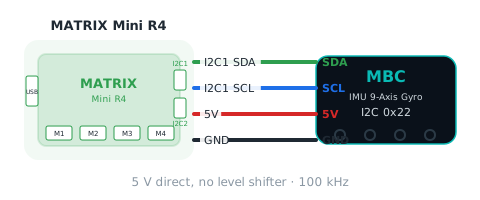
Get the MATRIX edition and connect it with the stock MATRIX 4-pin cable to I2C1 or I2C2 of the Mini R4 (address 0x22); pick that port in the block.
Setup
What you need
- Sensor: IMU 9-Axis Gyro (MATRIX edition).
- Controller: MATRIX Mini R4.
- Cable: the stock MATRIX 4-pin sensor cable.
- Software: MATRIXblock (the stock MATRIX block software). This method needs no extra library.
Install the software
- Install MATRIXblock (default folder
C:\matrixblock-r4\).
Make the software see the sensor
The Mini R4 sees the sensor as a stock colour sensor (I2C address 0x22); read it with the built-in blocks, no extension needed:
- The "colour sensor → R / G / B / C / M / Y / K" blocks each read one
0 ~ 255number. The firmware packs the product data into these seven slots; see the readings below for what each slot means. - MATRIXblock's Arduino mode works too:
MiniR4.I2C1.MXColor.getColor(R).
Warning
Do not use the H / S / V or colour ID blocks: the controller computes those from R, G, B itself, so they mean nothing for MBC products. MATRIX removed the grey-level and colour-number blocks, so only these seven slots are usable.
Wiring
- Connect the stock MATRIX 4-pin sensor cable to the Mini R4 I2C1 or I2C2 port.
- Choose that port in the blocks (for example
I2C1). - 5 V direct, no level shifter needed.
Zero the heading
MATRIXblock has no "send command" block, but the IMU firmware treats these two actions as zero the heading:
- Running the "colour sensor init" block (it already runs once at power-on, so the heading starts at 0).
- Reading the "colour sensor K" cell once.
To zero again during a run, read K once at that point. Do not read K inside a loop, or the heading keeps resetting to 0.
Tip
Tested with the stock library (2026-11-02, MatrixMiniR4 1.1.5): all three headings, pitch and zeroing read correctly; 2000 reads in a row with 0 errors. In the Arduino IDE, choose the board "UNO R4 WiFi".
First test
- Show the number from the "colour sensor → R" block.
- If the number changes with what is in front of the sensor, everything is connected.
FAQ
- The numbers make no sense? Make sure you use the seven slots R / G / B / C / M / Y / K, not the H / S / V or colour ID blocks.
Reading values
Use the stock MATRIXblock colour-sensor R / G / B / C / M / Y / K blocks (not H / S / V or colour ID); the Arduino-mode line is shown too.
gyro 3D heading headingGyro3D
| Range | Meaning |
|---|---|
-32768~32767 ° |
heading from the 3D quaternion, degrees, 0 at boot/zero, accumulates past 360 (wraps at ±32767, ~91 turns) |
Blocks "colour sensor → R~G": R = (航向+32768) 低 byte、G = 高 byte(R4 版:低在前);主機 hi×256+lo−32768
int raw = MiniR4.I2C1.MXColor.getColor(R); // group 1fused heading headingFused
| Range | Meaning |
|---|---|
-32768~32767 ° |
3D gyro heading slowly corrected by the magnetometer, degrees, relative to the zero point; may exceed 360 |
Blocks "colour sensor → B~C": B = 低 byte、C = 高 byte
int raw = MiniR4.I2C1.MXColor.getColor(B); // group 1gyro 1D heading headingGyro1D
| Range | Meaning |
|---|---|
-32768~32767 ° |
heading integrated about the yaw axis only, degrees, 0 at boot/zero; may exceed 360 |
Blocks "colour sensor → M~Y": M = 低 byte、Y = 高 byte;K(10)= 0
int raw = MiniR4.I2C1.MXColor.getColor(M); // group 1Not readable here:magnetic heading, yaw rate, pitch angle, pitch rate, magnetometer trust, magnetic disturbance, face up, gyro axis 1~3, accel axis 1~3, mag axis 1~3, command status. Use Arduino / mBlock / micro:bit for these.
Commands
This software cannot send commands; use Arduino I2C, mBlock or micro:bit if you need them.
Examples
There is no full example program for this software yet. Each item under “Reading values” and “Commands” above comes with code you can use as is; put them together in order, or contact us for a full example.
More questions
Still stuck? Contact us with your software and a screenshot of the program.
Downloads
Sources
- Host and software list:
_build/guides.json - Values and commands:
_build/protocol/imu.json(single source of truth) - Setup:
_build/guides/software/matrix-matrixblock.en.md、_build/guides/product/imu/matrix-matrixblock.en.md