
SharpShot Vision (ESP32CAM) × MATRIX × mVision blocks
Interactive tutorialMATRIX
First time? Try the interactive tutorial in your browser first, then follow the steps below with your hub.
School editionMATRIXblock
WRO editionMATRIXblock
This page covers MATRIXblock mVision serial blocks only: how to set it up for the SharpShot Vision (ESP32CAM) on MATRIX Mini R4, how to read every value, the commands it supports and examples. Use the switcher above to change product, host or software.
Which edition and how to connect
Get the MATRIX edition and connect it with the stock MATRIX 4-pin cable to I2C1 or I2C2 of the Mini R4 (address 0x22); pick that port in the block.
Setup
What you need
- Sensor: SharpShot Vision (ESP32CAM) (MATRIX edition).
- Controller: MATRIX Mini R4.
- Software: MATRIXblock, with the built-in mVision camera blocks. No library needed.
MATRIXblock only has camera blocks for mVision (Serial1 115200) and HuskyLens, with no I2C version, so this product does not use 0x22: it sends data in the mVision packet format instead.
Install the software
- Install MATRIXblock (default folder
C:\matrixblock-r4\). - No library files to change.
Make the software see the sensor
To the Mini R4, the sensor is an mVision camera:
- The "mVision data 0~9" blocks hold one number each; the sensor sends a packet every 20 ms.
- See the readings below for what each slot means.
Warning
Do not use data 10: the MATRIX program only declares 10 slots (data 0~9); slot 10 reads some other memory.
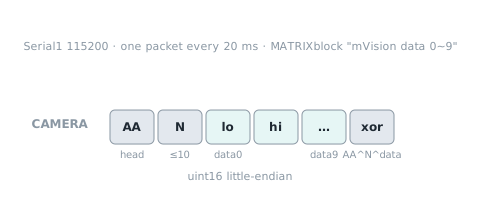
Wiring
- Connect the sensor to the Mini R4 serial port used by the mVision camera (Serial1, 115200).
- Use the mVision blocks in the program, not the colour sensor blocks.
Set the colour on the sensor first
All SharpShot settings are made on the colour screen and buttons on the back of the sensor, no computer needed: short-press the side button to open the settings menu, left / right to choose, OK to enter. Colour settings and camera parameters are saved automatically and used at the next power-on.
WRO edition (HUE12)
The WRO edition's mVision data keeps the original HUE12 packing (12 colour-spot codes + vividness); decode it as in the HUE12_AS_mVisionSensor_v1.0.8.mbr4 example. The HUE12 examples used by WRO 2026 teams are not affected. The school edition's data 0~9 use the same ranges as the EV3 / SPIKE editions, so program logic carries over directly.
First test
- Show the number from the "mVision data 0" block.
- Hold something coloured in front of the lens. If the number changes, everything is connected.
FAQ
- Strange numbers? Make sure "data 10" is not used; only data 0~9 are meaningful.
- Nothing from the colour sensor blocks? On MATRIX this product uses the serial port, so only the mVision blocks work.
Reading values (School edition)
On MATRIX the camera talks serial; read it with the built-in mVision camera blocks, not I2C.
hue hue
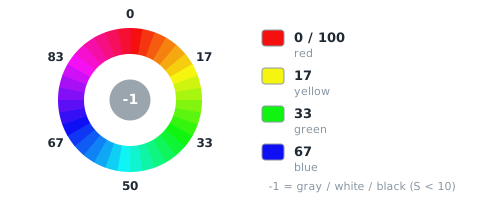
| Range | Meaning |
|---|---|
-1~100 |
hue of sample point S1, 0 |
The MATRIXblock mVision block reads data slot 0: 0~100;255 = 黑白灰(−1 不能放 uint16,MATRIX 定案 §7).
saturation saturation
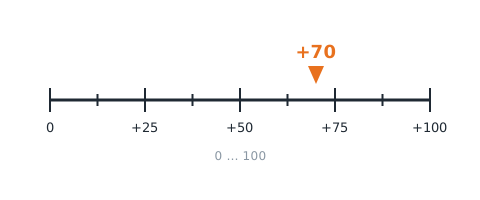
| Range | Meaning |
|---|---|
0~100 |
saturation of sample point S1, 0~100 |
The MATRIXblock mVision block reads data slot 1.
brightness value
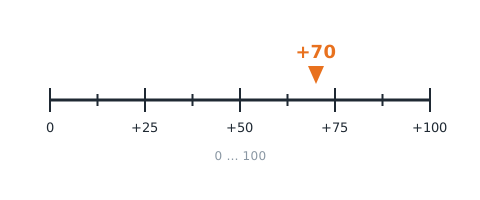
| Range | Meaning |
|---|---|
0~100 |
brightness (HSV value) of sample point S1, 0~100 |
The MATRIXblock mVision block reads data slot 2.
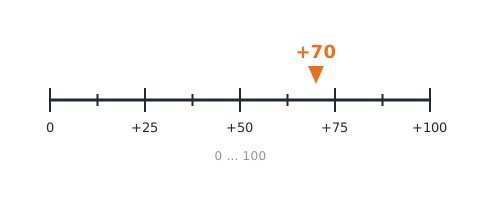
motion motion
| Range | Meaning |
|---|---|
0~100 |
whole-frame motion 0~100 (more change = larger) |
The MATRIXblock mVision block reads data slot 3.
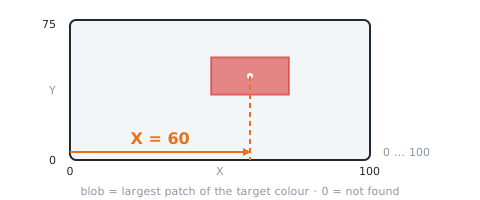
blob X blobX
| Range | Meaning |
|---|---|
0~100 |
blob centre X 0~100, left = 0; 0 when not found |
The MATRIXblock mVision block reads data slot 4.
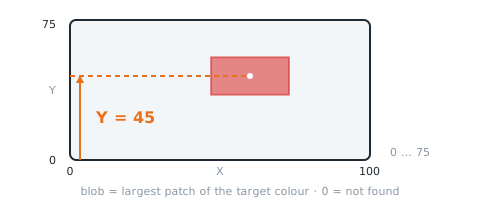
blob Y blobY
| Range | Meaning |
|---|---|
0~75 |
blob centre Y 0~75, bottom = 0, top = 75; 0 when not found |
The MATRIXblock mVision block reads data slot 5.
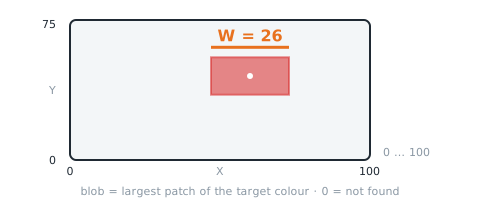
blob width blobW
| Range | Meaning |
|---|---|
0~100 |
blob width W 0~100; 0 = not found |
The MATRIXblock mVision block reads data slot 6.
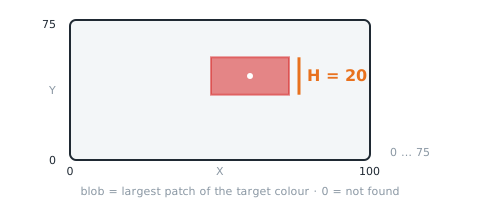
blob height blobH
| Range | Meaning |
|---|---|
0~75 |
blob height H 0~75; 0 when not found |
The MATRIXblock mVision block reads data slot 7.
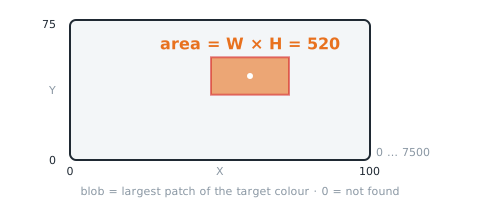
blob area blobArea
| Range | Meaning |
|---|---|
0~7500 |
W×H (0~7500); 0 when not found |
The MATRIXblock mVision block reads data slot 8: W×H.
blob found found
| Range | Meaning |
|---|---|
0~1 |
1 = a blob of the target colour is in view (W > 0), 0 = none |
The MATRIXblock mVision block reads data slot 9.
Reading values (WRO edition)
On MATRIX the camera talks serial; read it with the built-in mVision camera blocks, not I2C.
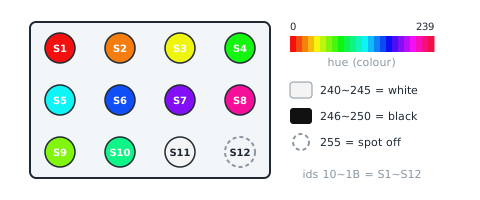
spot 1~12 colour code spotColor
| Range | Meaning |
|---|---|
0~255 |
10 |
The MATRIXblock mVision block reads data slot 05: 不動:byte 011 = S1~S12 顏色碼各 1 byte(idx 0 = S1 低 byte/S2 高 byte … idx 5 = S11/S12);照 HUE12_AS_mVisionSensor_v1.0.8.mbr4 解碼.
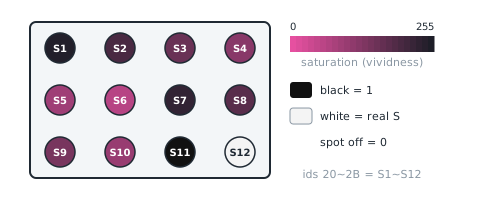
spot 1~12 vividness spotVivid
| Range | Meaning |
|---|---|
0~255 |
20 |
The MATRIXblock mVision block reads data slot 68: 不動:byte 1217 = 12 格各 4 bit(S>>4,1~15;黑 = 1;沒抓到 = 0),byte 12+2j = S(4j+1) | S(4j+2)<<4、byte 13+2j = S(4j+3) | S(4j+4)<<4.
Examples
There is no full example program for this software yet. Each item under “Reading values” above comes with code you can use as is; put them together in order, or contact us for a full example.
More questions
Still stuck? Contact us with your software and a screenshot of the program.
Downloads
Sources
- Host and software list:
_build/guides.json - Values and commands:
_build/protocol/cam_school.json、_build/protocol/cam_wro.json(single source of truth) - Setup:
_build/guides/software/matrix-mvision.en.md、_build/guides/product/esp32cam/matrix-mvision.en.md